
Social Media
Fonts for Instagram Bio: Copy and Paste 20+ Styles
25 bio fonts to copy and paste, sorted by account type. Exact iPhone and Android steps, plus which styles break Instagram search and hashtags.
Contents
- Why Your Instagram Bio Font Catches the Eye First
- Fonts for Instagram Bio Styles That Work
- Cursive/Script Fonts for Instagram Bio
- Bold Fonts for Instagram Bio
- Aesthetic/Y2K Fonts for Instagram Bio
- Bubble Text for Instagram Bio
- Gothic/Dark Fonts for Instagram Bio
- Small Caps Fonts for Instagram Bio
- Instagram Bio Font Examples by Style and Use Case
- Creator and Personal Brand Bio Examples
- Business and Service Bio Examples
- Aesthetic and Minimal Bio Examples
- Gaming and Fan Bio Examples
- Cute and Playful Bio Examples
- How to Copy and Paste Instagram Bio Fonts on iPhone and Android
- iPhone steps
- Android steps
- Instagram-Specific Tips and Compatibility Notes
- What Styled Bio Fonts Cannot Do
- Adding Symbols and Dividers to Your Bio (Without Changing the Font)
- Common Mistakes and How to Fix Them
- Frequently Asked Questions
- How do I get cool fonts for my Instagram bio?
- Do Instagram bio fonts work on Android?
- What is the best font style for an Instagram bio?
- Why do my fonts look different on someone else's phone?
- How many special characters can I put in my Instagram bio?
- How do I add special characters to my Instagram bio besides changing the font?
To create fonts for your Instagram bio, open the Instagram font generator for bios, type the name, tagline, or short bio line you want to style, choose a readable Unicode font, and tap Copy. Open Instagram, go to Edit Profile, paste the text into the Bio field, preview it on your profile, and save only if every character looks clear.
This guide shows bio font styles that work best in short Instagram profiles, gives 20+ copy-ready bio examples, and explains the exact iPhone and Android paste steps. The styles are Unicode text, not installed font files, so they can be copied from your browser and pasted into Instagram without a keyboard app or design tool.
Why Your Instagram Bio Font Catches the Eye First
Fonts for Instagram bio work best when they help a visitor understand your profile faster, not when they decorate every line. When someone visits your profile cold — from a hashtag, a tagged post, or a follower suggestion — they spend a few seconds deciding whether to follow. During that short moment, a styled first line can make the bio read as intentional instead of generic.
The reason Unicode font styles stand out is that they are not fonts at all. A regular "A" is the Unicode character U+0041. The letter "𝗔" in bold mathematical text is U+1D400 — a completely different character. Phones render them differently because they are different characters, not because any font was installed or changed.
The key point: When you paste styled Unicode text into your Instagram bio, visitors see different characters — not a different font. Every modern smartphone displays them correctly because they are part of the Unicode standard, which every operating system supports by default. No app, no install, no settings change required.
Fonts for Instagram Bio Styles That Work
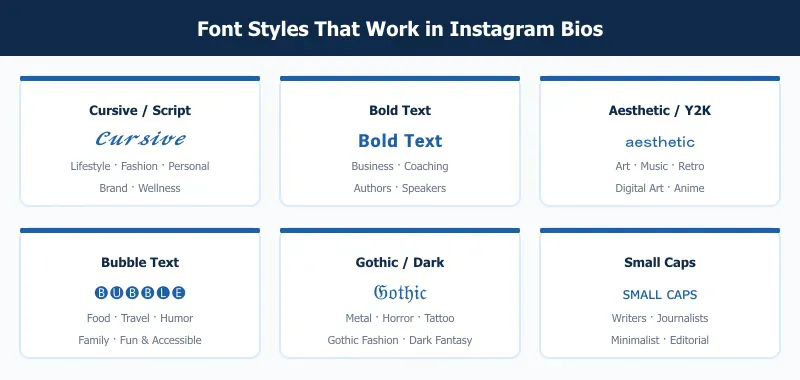
Here are the six most effective fonts for instagram bio, with real examples and specific use cases for each.
Cursive/Script Fonts for Instagram Bio
Example: 𝓒𝓾𝓻𝓼𝓲𝓿𝓮 𝓑𝓲𝓸 𝓣𝓮𝔁𝓽
Mathematical Script Bold characters give your bio a handwritten, flowing look. The letters are distinct from regular italic text — they read as personal and warm, and they hold up well at the small size of a mobile bio.
Use this for: lifestyle accounts, fashion profiles, personal branding, wellness creators, wedding services, coaching.
Tip: Apply this style to one line — your name or tagline. Writing an entire multi-line bio in script makes it slow to scan on a small screen.
Style your line in the cursive font generator, which shows every script variant side by side so you can judge them at bio size before copying.
Bold Fonts for Instagram Bio
Example: 𝗬𝗼𝘂𝗿 𝗡𝗮𝗺𝗲 𝗛𝗲𝗿𝗲
Mathematical Sans-Serif Bold reads clean at small sizes and makes a single line stand out above everything else. It is the closest Unicode equivalent to setting a header in a publishing tool.
Use this for: business accounts, coaches, consultants, speakers, and brands where the name or tagline needs to dominate visually.
Tip: Put your bold line first. Visitors read the opening line even when they do not finish the rest of the bio.
The bold text generator covers both the sans-serif and serif weights — the sans-serif one is the version that holds up at bio size.
Aesthetic/Y2K Fonts for Instagram Bio
Example: aesthetic vibes
Fullwidth Latin characters use the same width as Japanese glyphs — each letter is wide and evenly spaced. The result is immediately recognizable as internet-aesthetic, tied to Y2K nostalgia, early-internet references, and digital art culture.
Use this for: art accounts, music profiles, anime fan accounts, retro or vintage aesthetics, creative portfolios.
Tip: Use fullwidth characters for short bursts — a single word or short phrase. A full sentence in fullwidth takes noticeably longer to read.
Fullwidth sits alongside vaporwave and cottagecore variants in the aesthetic font generator, so you can compare how wide each one runs before committing a line to it.
Bubble Text for Instagram Bio
Example: 🅑🅤🅑🅑🅛🅔 🅣🅔🅧🅣
Enclosed alphanumeric characters place each letter inside a solid circle. The look is immediately playful and friendly, and it stands out even at thumbnail size when someone sees your profile at a small preview.
Use this for: food accounts, travel creators, humor pages, family accounts, anyone whose profile tone is approachable and fun.
Tip: Bubble characters are physically wider than standard letters, so your bio fills the 150-character limit faster. Write the plain text version first and check the length before applying the style.
Both the filled and outlined circles are in the bubble letter generator. The outlined set is the safer of the two on older Android.
Gothic/Dark Fonts for Instagram Bio
Example: 𝔊𝔬𝔱𝔥𝔦𝔠 𝔗𝔢𝔵𝔱
Fraktur Unicode characters reproduce the look of blackletter typography — medieval German printing style, now associated with metal music, gothic fashion, tattoo culture, and dark aesthetic content.
Use this for: metal music, gothic and dark fashion, horror content creators, tattoo artists, dark fantasy fiction accounts.
Tip: One word or your name in Gothic, then plain text for the rest. A full bio in Fraktur becomes difficult to parse quickly — the style works as an accent, not a body text replacement.
Plain and bold Fraktur are both available in the blackletter text generator. If you want the reasoning behind each blackletter variant rather than the tool itself, the gothic text guide goes through them.
Small Caps Fonts for Instagram Bio
Example: ꜱᴍᴀʟʟ ᴄᴀᴘꜱ ᴛᴇxᴛ
Small caps Unicode characters look like capital letters set at lowercase height. The result is clean and editorial — it reads like a print magazine subheading without pointing at any specific subculture or style community.
Use this for: writers, journalists, editors, thought-leaders, minimalist brands, any account that wants a polished look without being flashy.
Tip: This is one of the safest styles for cross-device compatibility. Small caps characters have wide support in both iOS and Android system fonts, and they render cleanly on older devices too.
Generate the line in the small caps generator, which also carries the subscript and superscript sets if you want something smaller still.
Instagram Bio Font Examples by Style and Use Case
Use these examples as starting points. Keep essential details such as booking links, prices, contact details, and locations in plain text so visitors can read them quickly.
Creator and Personal Brand Bio Examples
| Use case | Bio font example |
|---|---|
| Lifestyle creator | 𝓒𝓻𝓮𝓪𝓽𝓸𝓻 𝓛𝓲𝓯𝓮 |
| Photographer | 𝗣𝗼𝗿𝘁𝗿𝗮𝗶𝘁𝘀 + 𝗦𝘁𝗼𝗿𝗶𝗲𝘀 |
| Coach | 𝙈𝙞𝙣𝙙𝙨𝙚𝙩 𝘾𝙤𝙖𝙘𝙝 |
| Writer | ᴅᴀɪʟʏ ɴᴏᴛᴇꜱ |
| Travel creator | ✈ 𝑾𝒆𝒆𝒌𝒆𝒏𝒅 𝑮𝒖𝒊𝒅𝒆𝒔 |
Business and Service Bio Examples
| Use case | Bio font example |
|---|---|
| Salon | 𝗕𝗼𝗼𝗸 𝗬𝗼𝘂𝗿 𝗚𝗹𝗼𝘄 |
| Bakery | ⓕⓡⓔⓢⓗ ⓑⓐⓚⓔⓢ |
| Fitness trainer | 𝙎𝙩𝙧𝙤𝙣𝙜𝙚𝙧 𝙄𝙣 30 |
| Consultant | ᴄʟᴀʀɪᴛʏ ꜰᴏʀ ʙʀᴀɴᴅꜱ |
| Handmade shop | ✿ 𝓜𝓪𝓭𝓮 𝓫𝔂 𝓗𝓪𝓷𝓭 ✿ |
Aesthetic and Minimal Bio Examples
| Use case | Bio font example |
|---|---|
| Soft aesthetic | soft moments |
| Minimal creator | ᴄʟᴇᴀɴ ʟɪɴᴇꜱ |
| Study account | 𝚜𝚝𝚞𝚍𝚢 𝚗𝚘𝚝𝚎𝚜 |
| Wellness page | 𝓼𝓵𝓸𝔀 𝓵𝓲𝓿𝓲𝓷𝓰 |
| Moodboard account | ☾ 𝒅𝒓𝒆𝒂𝒎 𝒇𝒊𝒍𝒆𝒔 ☽ |
Gaming and Fan Bio Examples
| Use case | Bio font example |
|---|---|
| Gamer profile | 𝗟𝗲𝘃𝗲𝗹 𝗨𝗽 𝗗𝗮𝗶𝗹𝘆 |
| Clan bio | ᴄʟᴀɴ ɴɪɢʜᴛꜱ |
| Anime fan page | anime club |
| Music fan account | 𝕱𝖆𝖓 𝖅𝖔𝖓𝖊 |
| Sports fan bio | 𝙂𝙖𝙢𝙚 𝘿𝙖𝙮 𝙊𝙣𝙡𝙮 |
Cute and Playful Bio Examples
| Use case | Bio font example |
|---|---|
| Pet account | ⓟⓐⓦⓢ ⓐⓝⓓ ⓟⓛⓐⓨ |
| Food page | 𝓼𝔀𝓮𝓮𝓽 𝓫𝓲𝓽𝓮𝓼 |
| Friend account | ♡ ʟɪᴛᴛʟᴇ ᴅᴀʏꜱ ♡ |
| Craft page | ✿ 𝚌𝚛𝚎𝚊𝚝𝚎 𝚍𝚊𝚒𝚕𝚢 ✿ |
| Humor profile | 𝗷𝘂𝘀𝘁 𝗵𝗲𝗿𝗲 𝗳𝗼𝗿 𝗳𝘂𝗻 |
How to Copy and Paste Instagram Bio Fonts on iPhone and Android
Getting styled text from FontifyText into your bio takes about 90 seconds the first time.

iPhone steps
- Open Safari or Chrome and go to the Instagram font generator for bios.
- Type your name, bio opener, or short tagline in the text box.
- Compare the live font styles and choose one that stays readable.
- Tap Copy beside the style you want.
- Open the Instagram app and tap your profile picture.
- Tap Edit Profile, then tap Bio.
- Long-press in the bio field, tap Paste, preview the line, and tap Done or Save.
Android steps
- Open Chrome and go to the Instagram font generator for bios.
- Enter the plain version of your bio text.
- Scroll through the generated Unicode styles and pick a clear option.
- Tap Copy beside the result.
- Open Instagram, go to your profile, and tap Edit profile.
- Tap Bio, long-press the field, and choose Paste.
- Save the profile, then view it normally to check spacing, line breaks, and unsupported characters.
The whole process happens in your browser. Nothing gets downloaded or installed. You can also use the same Instagram font generator for captions, comments, and your display name.
Instagram-Specific Tips and Compatibility Notes
These are the details most people find out the hard way.
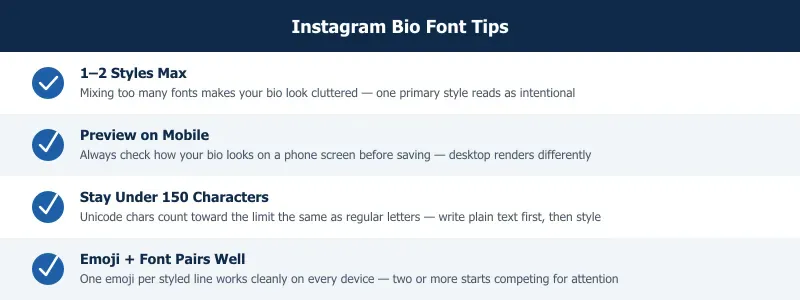
The line break trick. Instagram removes line breaks when you type directly in the bio field on the app. The fix: draft your bio in your phone's Notes app, put a period on a blank line between sections, then copy the entire text and paste it into the bio field. Instagram preserves the structure.
iPhone vs. Android rendering. Bold, italic, cursive script, and small caps render correctly on Android 7 and above, which covers the vast majority of active devices in 2026. Bubble text (enclosed alphanumerics) and some box-drawing characters can show as empty squares on Android 6 and older. If your audience skews toward older devices, small caps or bold are the reliable choices.
Emoji alongside Unicode text. Emoji and styled Unicode characters coexist cleanly. A fire emoji before a cursive line looks correct on every device. Keep it to one emoji per line — two or more emoji next to styled text starts to compete for attention and the line becomes harder to scan.
The 150-character count. Every Unicode character — including styled Mathematical Alphanumeric letters — counts as one character toward your limit. A fullwidth "A" has the same character count as a plain "A". The only exception is some emoji, which Instagram counts as two characters due to multi-codepoint encoding. To stay safe: write your text in under 140 characters before applying a style, which leaves room for a period and one emoji. The character counter shows the count Instagram will use rather than the doubled figure most counters report for styled text.
What Styled Bio Fonts Cannot Do
Styled Unicode is still text, but Instagram treats it as different text from the plain letters it imitates. That has four consequences worth knowing before you commit your profile to it.
Search stops matching your name. Instagram's search compares the actual characters stored, not how they look. If your display name is 𝓜𝓪𝔂𝓪 𝓡𝓲𝓿𝓮𝓻𝓪, someone typing "Maya Rivera" will not find you — the stored characters are Mathematical Script, not the Latin letters they resemble. Keep the plain spelling in the Name field, which is the field search matches, and put the styled version in the bio where being findable is not the job.
Styled hashtags and mentions stop working. #𝓵𝓸𝓿𝓮 is not the hashtag #love — it is decorative text with a hash in front, so it is not clickable and appears in no hashtag feed. The same applies to @ mentions: they must be the exact username to link. Style the words around them, not the tags themselves.
Usernames will not accept it at all. The @username field allows only letters, numbers, periods and underscores. Styled characters are rejected outright. The 30-character Name field does accept them, which is why the trade-off above is a real decision rather than a theoretical one.
Screen readers handle it badly. VoiceOver and TalkBack read Mathematical Alphanumeric characters by their Unicode descriptions or skip them, so a fully styled bio can be announced as a run of character names or as nothing at all. A visitor using one hears your bio as noise. Keeping one styled line and the rest in plain text solves this and keeps the bio scannable for everyone else too.
None of this argues against styled fonts — it argues for using them on the lines where appearance matters and leaving the lines that have a job to do in plain text. The Instagram font generator is where you decide which line is which.
Adding Symbols and Dividers to Your Bio (Without Changing the Font)
Not every bio decision is about font style. Sometimes you just want a plain symbol between a name and a tagline, or a small divider between two lines — no styling involved. These characters sit outside the Mathematical Alphanumeric blocks covered above, so they're worth treating on their own.
Dividers and symbols that render reliably on both iOS and Android: • · – — | ~ ❀ ✿ ❁ ☾ ☽ ✧ ⋆ ♡ ✈ ⚡ ☕
Use them the same way as the styled text above — copy, paste, preview. A single symbol between two short phrases (Maya ✿ Photographer) reads cleaner than three or four stacked in a row. Each one counts toward your character limit the same as plain punctuation.
Want a larger set — arrows, stars, brackets, less common punctuation? The Unicode symbols page has a searchable list you can copy straight from. Looking for a small face or expression instead of a symbol? Try kaomoji.
Common Mistakes and How to Fix Them
Using styles that break on older devices. Stick to Mathematical Alphanumeric Symbols (bold, italic, script, Fraktur, double-struck) and Unicode Latin Extended ranges (small caps). These have glyph coverage in modern system fonts. Avoid pulling text from obscure Unicode blocks — Braille patterns, box-drawing characters, and combining diacritics can render as squares on Android 6 and below.
Pasting into the wrong field. Bio text and caption text render at different sizes. A style that looks balanced in a caption might feel cramped or oversized in a bio. Always test the paste specifically in the bio field on a phone, not a desktop browser or the Instagram web app.
Mixing three or more styles in one bio. One primary style plus plain text reads as deliberate. Two different styles can work if they serve distinct visual roles — name versus tagline, for example. Three styles in one bio looks scattered, and every line competes for attention instead of building a cohesive identity.
Skipping the mobile preview. Instagram's Edit Profile screen on desktop and on mobile render text slightly differently. After saving your bio, open your profile from a fresh browser tab or another device. That is what visitors actually see — not the editing interface.
Frequently Asked Questions
How do I get cool fonts for my Instagram bio?
Use the free font generator at FontifyText. Go to the site, type your bio text into the input box, and scroll through the styles that appear below it. Styles update instantly as you type. When you find one you like, click Copy, then paste directly into the Instagram bio field on your phone. No account is needed, nothing is installed, and common Unicode styles usually render on current iPhone and Android devices. The whole process takes under two minutes the first time.
Do Instagram bio fonts work on Android?
Yes. The Unicode styles available through FontifyText — including Mathematical Script (cursive), Mathematical Sans-Serif Bold, Small Caps, and Fraktur — display correctly on Android 7 and above. That covers Samsung Galaxy, Google Pixel, OnePlus, and most other current Android phones. Some very old devices running Android 6 may show empty squares for a few character types, but the most popular styles render correctly on the devices people are actually using today. If you are unsure, cursive and bold are the safest cross-device picks.
What is the best font style for an Instagram bio?
It depends on your niche. Cursive script is the top choice for lifestyle, fashion, and personal accounts — it reads as warm and personal. Bold Unicode works best when you want one line, your name or tagline, to visually dominate the bio. Small caps is the most versatile option: it adds a polished, editorial look without sending a strong style signal, which makes it effective across most account types. These fonts for instagram bio choices should match your overall content tone, not just look visually interesting in isolation.
Why do my fonts look different on someone else's phone?
The Unicode characters are identical across devices — what varies is the system font that renders them. On iOS, San Francisco handles Mathematical Alphanumeric characters with specific proportions. On Android, the Noto font family fills those same characters but with slightly different stroke weights and spacing. The style reads as the same style on both platforms; the rendering is just a few pixels different. This is the same reason regular text looks slightly different on iOS versus Android — it is a font rendering difference, not a character difference.
How many special characters can I put in my Instagram bio?
Instagram allows 150 characters in the bio field. Every Unicode character, including styled letters from Mathematical Alphanumeric Symbol blocks, counts as exactly one character. Most standard emoji count as one character in Instagram's counter. Some multi-codepoint emoji — flag emoji and certain skin-tone modifier combinations — count as two. A safe approach: write your bio in plain text first and keep it under 130 characters. That leaves room for line-break periods and one or two emoji without hitting the limit by accident.
How do I add special characters to my Instagram bio besides changing the font?
Copy the character directly instead of running it through the font generator — symbols like ✿, ☾, ♡, and • are already standard Unicode characters, not styled text, so they paste identically on every device. Browse a wider set on the Unicode symbols page if the common dividers above don't cover what you need.
Pick the style that fits your profile and paste it in after testing it on your phone. Try the Instagram font generator for bios and see which style looks right for your account. If you also post on TikTok, the guide on TikTok caption fonts covers the same process for captions across that platform.