
Games
Gothic Text Copy and Paste: Dark Blackletter Fonts
Gothic text copy and paste guide: dark Fraktur and blackletter Unicode for Discord, Instagram bios and TikTok profiles, and where each style works.
Contents
- What Is Gothic Text?
- How to Copy and Paste Gothic Text
- Best Uses for Gothic Copy-Paste Text
- Gothic Text Copy and Paste Examples
- Medieval, Fraktur, and Dark-Style Examples
- Gothic, Blackletter, Fraktur, and Old English Text
- Gothic Text Readability and Platform Support
- Gothic vs Other Dark Text Styles
- Common Mistakes to Avoid
- Frequently Asked Questions
- Is gothic text the same as a gothic font?
- Can I copy and paste gothic text on Instagram?
- Why does gothic text sometimes show boxes?
- Is gothic text good for usernames?
- Is gothic text copy and paste free?
- Do I need Discord Nitro to use gothic nicknames?
- How is this different from other gothic generators like YayText?
- Final Tips for Better Gothic Text
What Is Gothic Text?
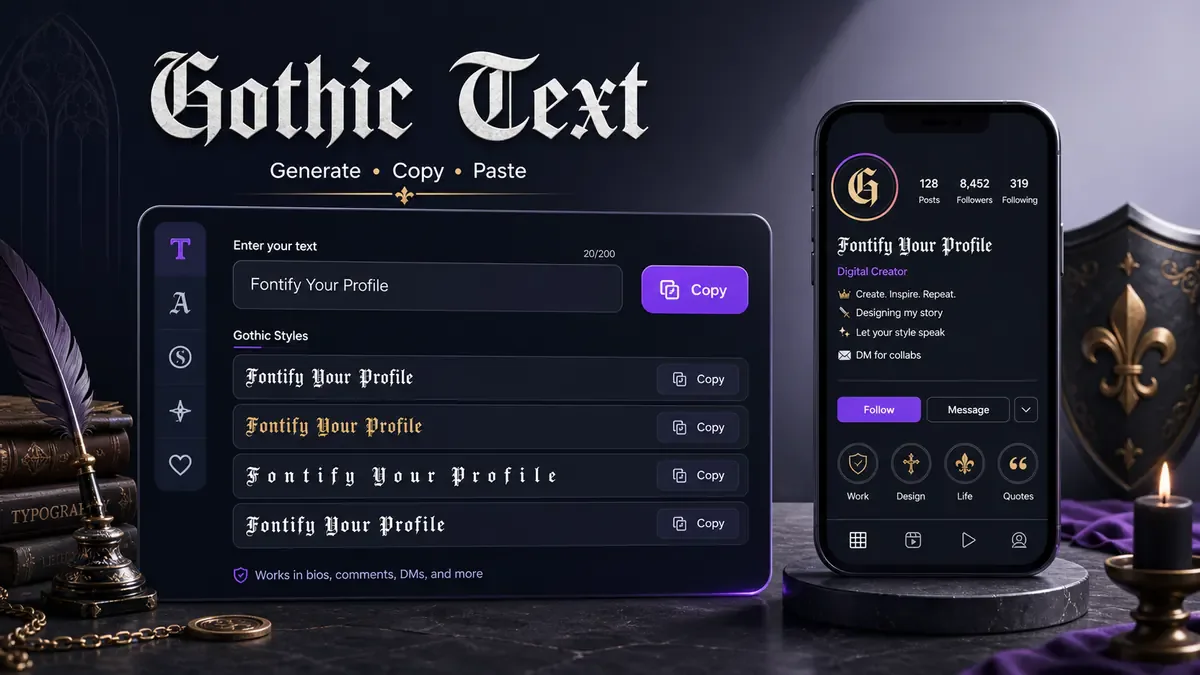
Gothic text copy and paste means blackletter, Fraktur, or Old English-style Unicode characters you can paste into bios, captions, usernames, and gaming names. The look comes from characters that have a dark, angular shape. Some of these symbols belong to mathematical alphanumeric blocks or related Unicode character sets, which is why they can be copied and pasted like ordinary text.
This is not the same as installing a gothic font file on your device. A font file changes how normal letters are drawn inside one website, design app, or document. Copy-paste gothic text uses different characters altogether. When you paste the result into a social bio or caption, the app receives those styled Unicode characters.
That difference is useful for social platforms because most of them do not let users upload custom fonts. You cannot install a blackletter font into an Instagram bio field, but you can paste Unicode characters that already look like blackletter.
There is one tradeoff. Some gothic letters are harder to read than plain text, and older devices or certain apps may show fallback boxes for uncommon symbols. That is why gothic text should be tested before you use it in a profile name, gaming handle, or public caption.
How to Copy and Paste Gothic Text
The workflow is quick, but the best result comes from choosing a style that matches the place where you will paste it.
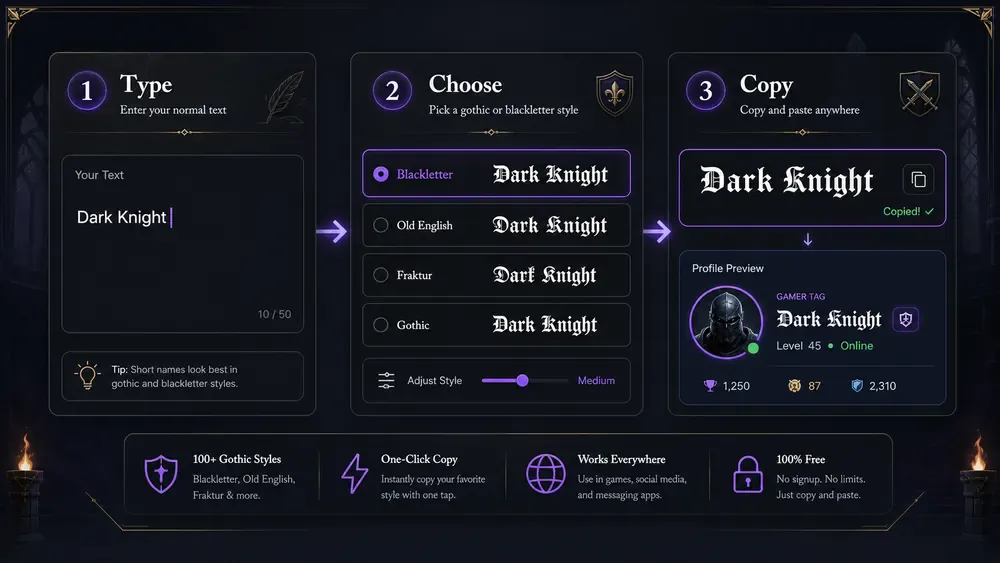
- Type your text into the generator.
- Choose a gothic, blackletter, Fraktur, or Old English style.
- Copy the generated text.
- Paste it into social profiles, captions, usernames, gaming names, or bios.
- Test it on mobile before saving.
Use the free font generator when you want to compare gothic with other copy and paste fonts. For the most direct route, open the gothic font generator. If your text needs more weight but less medieval style, the bold font generator is usually easier to read. For a full guide on creating strong, readable bold letters, see the bold text generator.
Keep the first test short. A name like Raven or a phrase like dark mode is easier to judge than a full sentence. If the line looks crowded in the generator preview, it will likely look more crowded inside a mobile app.
Expert note: on X, every Fraktur letter counts as two characters toward the 280-character post limit and the 160-character bio limit, because these characters sit outside the ranges X counts as one. A 20-letter gothic line costs 40 characters there. Count the plain text first and leave that room before you paste the styled version.
Best Uses for Gothic Copy-Paste Text
Gothic text works when the style supports the identity of the page or post. It is not a neutral everyday font. That is why it does well in specific places.
Gaming usernames are a common use. A short gothic name can look strong in a player list, clan roster, or Discord server. Avoid styling every extra symbol around it. The name should still be searchable and recognizable.
Dark aesthetic Instagram bios can use gothic text for one line, such as a page title or mood phrase. Keep contact details, pronouns, location, or shop info in plain text.
TikTok captions can use gothic text for short dramatic phrases. It works for edits, fantasy clips, dark fashion, music posts, and Halloween content. Keep the caption readable because viewers scroll quickly.
Discord names can use gothic text in creative servers, roleplay spaces, and gaming groups. The nickname field accepts standard Unicode, including the Fraktur and blackletter characters this generator produces — and that has nothing to do with Nitro. The subscription controls custom emoji and animated avatars, not which characters you can paste into a name.
Two limits apply everywhere instead. Discord caps nicknames and server names at 32 characters, and some servers run moderation bots that strip non-standard characters. If a styled name keeps reverting to plain text, check that server's rules before assuming the tool is broken.
Check server rules first either way, since some communities prefer simple names. For more Discord font ideas, read the Discord fonts guide.
Halloween posts, fantasy captions, medieval jokes, tattoo-style lines, and metal band style text can all use gothic letters. The style has a strong voice, so it should be chosen on purpose rather than used everywhere.
If you want a lighter, playful contrast to gothic's dark tone, try the bubble text generator for rounded circle letters that suit casual captions and fun usernames.
Gothic Text Copy and Paste Examples
Good gothic text examples are short and sharp. If the line becomes hard to read, reduce the length before changing the style.
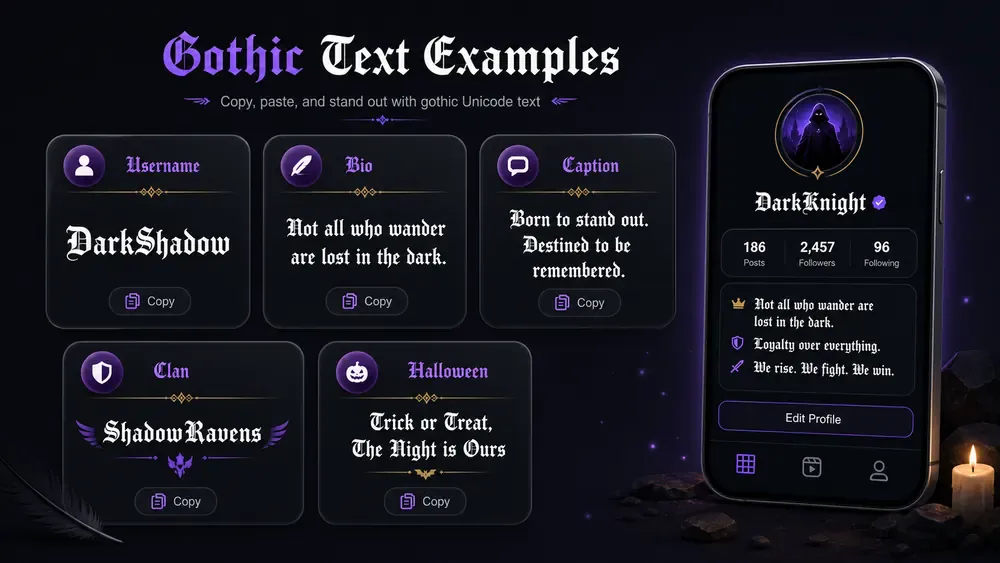
Every line below is real Unicode — select it, copy it, and paste it straight into a bio or username field. Fraktur is the lighter of the two; Bold Fraktur holds up better on small screens.
| Plain text | Fraktur | Bold Fraktur | Works well as |
|---|---|---|---|
| Raven | ℜ𝔞𝔳𝔢𝔫 | 𝕽𝖆𝖛𝖊𝖓 | Username |
| Shadow | 𝔖𝔥𝔞𝔡𝔬𝔴 | 𝕾𝖍𝖆𝖉𝖔𝖜 | Username |
| Grim | 𝔊𝔯𝔦𝔪 | 𝕲𝖗𝖎𝖒 | Gaming tag |
| Wraith | 𝔚𝔯𝔞𝔦𝔱𝔥 | 𝖂𝖗𝖆𝖎𝖙𝖍 | Gaming tag |
| Void | 𝔙𝔬𝔦𝔡 | 𝖁𝖔𝖎𝖉 | Short handle |
| Hex | ℌ𝔢𝔵 | 𝕳𝖊𝖝 | Short handle |
| Crimson | ℭ𝔯𝔦𝔪𝔰𝔬𝔫 | 𝕮𝖗𝖎𝖒𝖘𝖔𝖓 | Clan name |
| Requiem | ℜ𝔢𝔮𝔲𝔦𝔢𝔪 | 𝕽𝖊𝖖𝖚𝖎𝖊𝖒 | Clan name |
| dark academia | 𝔡𝔞𝔯𝔨 𝔞𝔠𝔞𝔡𝔢𝔪𝔦𝔞 | 𝖉𝖆𝖗𝖐 𝖆𝖈𝖆𝖉𝖊𝖒𝖎𝖆 | Bio line |
| after midnight | 𝔞𝔣𝔱𝔢𝔯 𝔪𝔦𝔡𝔫𝔦𝔤𝔥𝔱 | 𝖆𝖋𝖙𝖊𝖗 𝖒𝖎𝖉𝖓𝖎𝖌𝖍𝖙 | Bio line |
| no light | 𝔫𝔬 𝔩𝔦𝔤𝔥𝔱 | 𝖓𝖔 𝖑𝖎𝖌𝖍𝖙 | Caption |
| stay wild | 𝔰𝔱𝔞𝔶 𝔴𝔦𝔩𝔡 | 𝖘𝖙𝖆𝖞 𝖜𝖎𝖑𝖉 | Caption |
Note the capitals. C, H, I, R and Z have no Fraktur character of their own, so Unicode reuses the letterlike forms ℭ ℌ ℑ ℜ ℨ, which sit slightly differently from the rest of the set. Bold Fraktur has a complete alphabet, which is why 𝕮𝖗𝖎𝖒𝖘𝖔𝖓 looks more even than ℭ𝔯𝔦𝔪𝔰𝔬𝔫.
For anything longer than these, use the blackletter font generator rather than copying from a table.
Short username:
𝔯𝔞𝔳𝔢𝔫
This works better than a long handle because each letter has room to breathe. If the name has many narrow letters, try another gothic style and compare spacing.
Dark bio line:
𝔟𝔬𝔯𝔫 𝔦𝔫 𝔫𝔦𝔤𝔥𝔱
Use it as the first line of a bio, then write the practical details below in plain text.
Medieval caption:
𝔱𝔥𝔢 𝔬𝔩𝔡 𝔤𝔞𝔱𝔢 𝔬𝔭𝔢𝔫𝔰
This fits fantasy artwork, book posts, roleplay captions, and medieval mood edits.
Gaming clan name:
𝔑𝔦𝔤𝔥𝔱 𝔒𝔯𝔡𝔢𝔯
Use title case or spaces to keep clan names readable. All lowercase gothic letters can become dense in longer names.
Halloween text:
𝔬𝔠𝔱𝔬𝔟𝔢𝔯 𝔪𝔬𝔬𝔡
Short seasonal phrases work well because people understand the tone immediately.
Medieval, Fraktur, and Dark-Style Examples
These examples are grouped by tone, so you can match the line to the mood of the profile, clan, or post.
Medieval
𝔎𝔦𝔫𝔤 𝔄𝔯𝔱𝔥𝔲𝔯 · 𝔱𝔥𝔢 𝔞𝔫𝔠𝔦𝔢𝔫𝔱 𝔱𝔥𝔯𝔬𝔫𝔢 · 𝔠𝔞𝔰𝔱𝔩𝔢 𝔴𝔞𝔩𝔩𝔰 · 𝔰𝔴𝔬𝔯𝔫 𝔱𝔬 𝔡𝔞𝔯𝔨𝔫𝔢𝔰𝔰 · 𝔦𝔯𝔬𝔫 𝔠𝔯𝔬𝔴𝔫 · 𝔱𝔥𝔢 𝔩𝔞𝔰𝔱 𝔨𝔦𝔫𝔤𝔡𝔬𝔪 · 𝔡𝔯𝔞𝔤𝔬𝔫 𝔰𝔩𝔞𝔶𝔢𝔯 · ℭ𝔞𝔪𝔢𝔩𝔬𝔱 𝔯𝔦𝔰𝔢𝔰
Good for fantasy roleplay names, book and game posts, and medieval-themed captions.
Fraktur
𝔉𝔯𝔞𝔨𝔱𝔲𝔯 𝔖𝔱𝔲𝔡𝔦𝔬 · 𝔒𝔩𝔡 𝔚𝔬𝔯𝔩𝔡 𝔓𝔯𝔢𝔰𝔰 · 𝔭𝔯𝔦𝔫𝔱𝔢𝔡 𝔦𝔫 𝔅𝔢𝔯𝔩𝔦𝔫 · 𝔱𝔥𝔢 𝔭𝔯𝔦𝔫𝔱𝔢𝔯𝔰 𝔤𝔲𝔦𝔩𝔡 · 𝔟𝔩𝔞𝔠𝔨 𝔦𝔫𝔨 𝔭𝔯𝔢𝔰𝔰 · 𝔊𝔲𝔱𝔢𝔫𝔟𝔢𝔯𝔤 𝔰𝔱𝔶𝔩𝔢
These lean into the historical German blackletter tradition the Mathematical Fraktur Unicode block is modeled on — a good fit for editorial or old-press style branding.
Dark style
𝔪𝔦𝔡𝔫𝔦𝔤𝔥𝔱 𝔯𝔢𝔦𝔤𝔫 · 𝔰𝔥𝔞𝔡𝔬𝔴 𝔴𝔞𝔩𝔨𝔢𝔯 · 𝔱𝔥𝔢 𝔳𝔬𝔦𝔡 𝔠𝔞𝔩𝔩𝔰 · 𝔢𝔱𝔢𝔯𝔫𝔞𝔩 𝔫𝔦𝔤𝔥𝔱 · 𝔠𝔲𝔯𝔰𝔢𝔡 𝔟𝔩𝔬𝔬𝔡𝔩𝔦𝔫𝔢 · 𝔴𝔯𝔞𝔦𝔱𝔥 𝔨𝔦𝔫𝔤 · 𝔡𝔢𝔞𝔱𝔥 𝔟𝔢𝔣𝔬𝔯𝔢 𝔡𝔦𝔰𝔥𝔬𝔫𝔬𝔯 · 𝔞𝔰𝔥𝔢𝔰 𝔞𝔫𝔡 𝔢𝔪𝔟𝔢𝔯𝔰
This group suits horror content, metal and punk profiles, and dramatic gaming clan names. For an even more distorted, corrupted look than Fraktur provides, see the cursed text generator. If you're naming a competitive gaming profile specifically, the gaming username font generator covers readability rules for clan tags and platform-specific character limits.
Gothic, Blackletter, Fraktur, and Old English Text
People often use these names for similar styles, but they are not exactly the same.
Gothic text is the broad everyday term people use when they want dark, medieval-looking letters. It covers many blackletter-style Unicode results and is the easiest phrase for social media users to understand.
Blackletter refers to a historical lettering style with heavy strokes, sharp angles, and dense texture. It appears in old manuscripts, early printing, tattoo design, metal music visuals, and fantasy design.
Fraktur is a specific blackletter style associated with German printing. In Unicode generators, Fraktur-style characters are often the ones people recognize as gothic letters.
Old English text is another common name. Strictly speaking, Old English is a language period, not only a type style. Online, people often use it to mean medieval-looking blackletter letters.
For practical use, the labels matter less than readability. Pick the style that looks clear on your device and fits the tone of the profile or caption.
Gothic Text Readability and Platform Support
Gothic text can be harder to read because the strokes are thick and the letterforms are complex. That is part of its appeal, but it also means the style needs restraint.
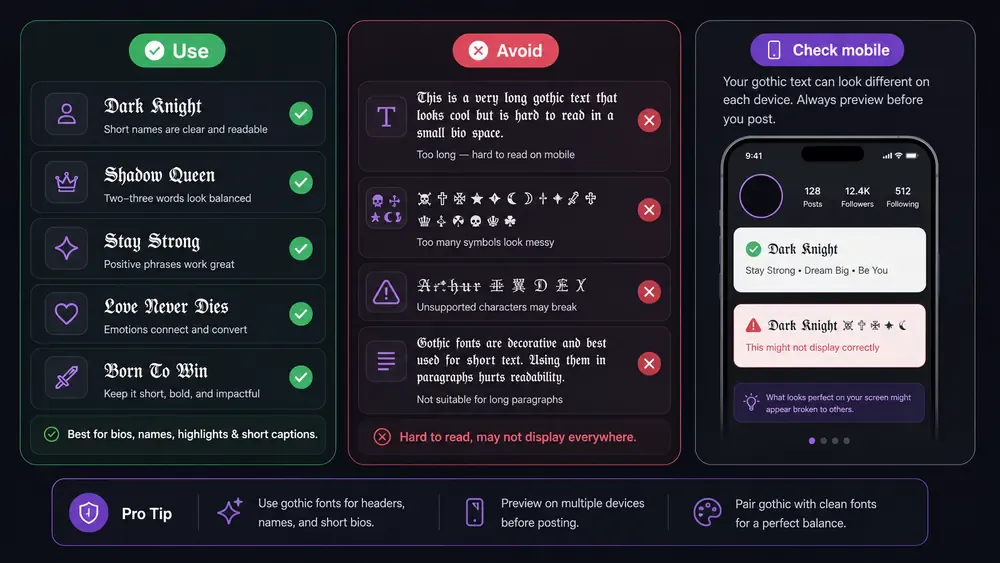
Use gothic text for short phrases, names, headers, and dramatic one-liners. Avoid using all-gothic long paragraphs. A caption written entirely in blackletter may look impressive at first glance, but most people will skip it if it takes effort to read.
Check on mobile before posting. A desktop browser can make gothic letters look spacious, while a phone may squeeze the same line into two or three wraps. This is especially important for bios, where every line break changes the shape of the profile.
Some apps may display fallback boxes if a character is unsupported. This is less common on modern devices, but it can still happen in older apps, in game clients, or in fields with stricter character support. If you see boxes, choose a simpler style from the generator.
For usernames, use gothic letters only if the platform accepts them and people can still identify you. A display name can be more decorative than a handle. A handle should be easy to search, mention, and remember.
Gothic vs Other Dark Text Styles
Gothic is not the only dark-looking option, and picking the wrong one is a common mistake. These four get confused with each other constantly.
| Style | Example | What it actually is | Use it when |
|---|---|---|---|
| Gothic / Fraktur | 𝔯𝔞𝔳𝔢𝔫 | A complete alternate alphabet | You want it readable and permanent |
| Cursed | Яα𝓥ℯ𝓃 | Letters borrowed from several unrelated scripts | You want chaotic rather than elegant |
| Zalgo | R̛̪̹̘̙͑̅̌ͣ̇a̷͔͉̘ͫͤv̹̻̎e̷̲̟̬n͙̙͌ | Normal letters buried under stacked marks | You want a glitch effect, briefly |
| Creepy | Ʀąѵҽղ | Lookalike letters with odd shapes | You want unsettling but still legible |
The practical difference is durability. Gothic text is one clean substitution per letter, so it survives being pasted, re-copied and shown on any modern device. Zalgo stacks combining marks above and below, which many apps trim, collapse or reject outright — Instagram in particular strips heavy Zalgo from bios. Cursed and creepy styles sit in between: they render nearly everywhere, but because they pull characters from unrelated alphabets, screen readers announce them as gibberish and search cannot match them.
If the text has to stay put — a username, a clan tag, a bio you will not edit for months — gothic is the safest of the four.
Common Mistakes to Avoid
One common mistake is using gothic text for full paragraphs. The style is too dense for long reading. Use it as a title, name, or accent line, then switch back to plain text.
Another mistake is making usernames unreadable. If people cannot tell whether a letter is an n, m, u, or v, the name may look cool but fail in conversation.
Too many decorative symbols create a third problem. Gothic text already has a strong shape. Extra skulls, arrows, brackets, and stars can make the line feel crowded.
The fourth mistake is using gothic text where clean text is needed. Addresses, prices, email names, safety instructions, and business calls to action should stay plain.
The fifth mistake is not testing on Android and iPhone. The same Unicode characters can render with small differences across systems. Test the line where your audience will see it, not only inside the generator preview.
Frequently Asked Questions
Is gothic text the same as a gothic font?
No. Gothic copy-paste text uses Unicode characters that look like gothic or blackletter letters. A gothic font file changes normal letters only where that font is installed or loaded.
Can I copy and paste gothic text on Instagram?
Yes. Instagram accepts many Unicode gothic characters in bios, captions, comments, and display names. Use short phrases and check the result on your phone before saving.
Why does gothic text sometimes show boxes?
Boxes usually mean the app, device, or field does not support one or more Unicode characters. Try a simpler gothic style or use plain text in stricter username fields.
Is gothic text good for usernames?
It can be good for short display names, gaming names, and clan names. For searchable handles, keep the text readable and avoid too many symbols.
Is gothic text copy and paste free?
Yes. Gothic text copy and paste costs nothing — the gothic text generator runs in your browser with no app or account.
Do I need Discord Nitro to use gothic nicknames?
No. Discord's nickname field takes standard Unicode text on any account, free or Nitro. Fraktur and blackletter characters work the same on both. Nitro changes things like custom emoji, avatars and upload limits, not which characters a nickname accepts. The real limits are the 32-character nickname cap and any server-side bot filtering.
How is this different from other gothic generators like YayText?
The character output is nearly identical, since most gothic generators pull from the same Unicode blocks. What varies is style selection, copy behavior, and how cleanly a tool handles spacing in longer phrases. See the FontifyText vs LingoJam vs YayText comparison for a direct breakdown.
Final Tips for Better Gothic Text
Use gothic text when you want a line to feel dark, medieval, dramatic, or fantasy-inspired. Keep it short, test it on mobile, and let plain text handle the details people need to read quickly.
Try your phrase in the free font generator, compare styles in the gothic style generator, and paste the final version into your app before saving. Gothic text copy and paste works best when the line is short, readable, and tested on mobile. If you want a softer handwritten look, read the cursive text generator guide and compare it with gothic letters.