
Unicode Text
Fonts for WhatsApp: Stylish Text for Status and Bio
Learn how to use fonts for WhatsApp messages, Status, names, and About fields with readable Unicode styles, clear steps, and practical examples.
Contents
- What Are Fonts for WhatsApp?
- Why the Text May Look Different on Another Device
- What Font Does WhatsApp Use?
- How to Use Fonts for WhatsApp Messages
- iPhone steps
- Android steps
- Message Example
- Using Stylish Text in Status and Profile Fields
- How to Use Stylish Text in WhatsApp Status
- Setting a Fancy Font in Your WhatsApp Name and About
- Ready-Made Lines for Status, About and Messages
- WhatsApp Font Styles Compared
- Picking a Readable Style
- Accessibility and Search Limitations
- Using Fonts in Groups, Broadcasts and Business Messages
- Using Fonts in WhatsApp Group Chats and Broadcasts
- Using Fancy Fonts in WhatsApp Business Messages
- WhatsApp Built-In Formatting vs. Unicode Fonts
- Use Native Formatting For
- Use Unicode Styles For
- Frequently Asked Questions
- Do fonts for WhatsApp work on iPhone and Android?
- Can I use fancy fonts in WhatsApp Status without downloading an app?
- Which style should I use for Eid or another festive message?
- Can decorative Unicode text cause a WhatsApp account restriction?
- Why do fonts for WhatsApp look different on another phone?
- What font does the WhatsApp app itself use?
- Conclusion
Want to use fonts for WhatsApp messages, Status updates, names, or bios? This guide explains how to create and paste readable Unicode text styles such as bold, cursive, bubble, and Gothic without installing another app.
Follow the quick steps below, then use the detailed sections for messages, Status, profile fields, groups, and WhatsApp Business.
Quick steps:
- Open a browser-based Unicode text generator.
- Type the text you want to style.
- Select a readable Unicode style.
- Tap the copy button next to your chosen style.
- Paste it into a supported WhatsApp text field.
- Preview the result before sending or saving.
- Keep important details in plain text.
What Are Fonts for WhatsApp?
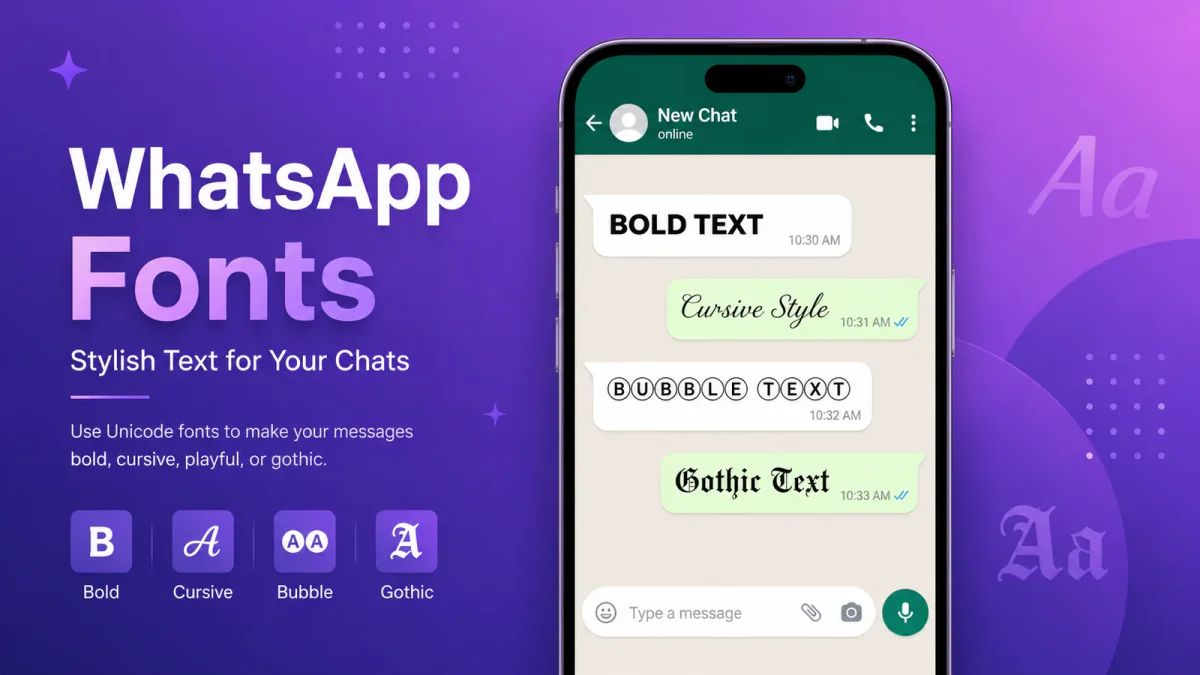
WhatsApp does not include a permanent font picker for ordinary chat text. The styles commonly described as WhatsApp fonts are Unicode characters that resemble lettering such as script, Gothic, bubble, bold, or fullwidth text.
Unicode is the international character-encoding standard used by modern software and devices. Unicode 17.0 contains 159,801 encoded characters. These include mathematical letter-like symbols, fullwidth forms, compatibility characters, and many other symbols.
A Unicode text generator maps ordinary letters to matching characters. For example, entering "Hello" and selecting a script option may produce:
𝓗𝓮𝓵𝓵𝓸
You can copy those characters and paste them into a supported WhatsApp field. They are sent as text rather than as an image, downloadable font file, or special WhatsApp command.
The familiar term "font generator" is used throughout this guide, but the tool is converting characters rather than installing a new typeface in WhatsApp.
Why the Text May Look Different on Another Device
Decorative characters can appear on many modern phones and computers, but their exact appearance depends on the operating system, installed fonts, app version, and character support.
An unsupported character may appear as a missing-glyph symbol, a blank space, or no visible character. Even when every character is supported, details such as spacing, curves, and stroke weight may differ between devices.
Use decorative Unicode for short headings or greetings. Keep dates, addresses, prices, phone numbers, booking references, and instructions in plain text.
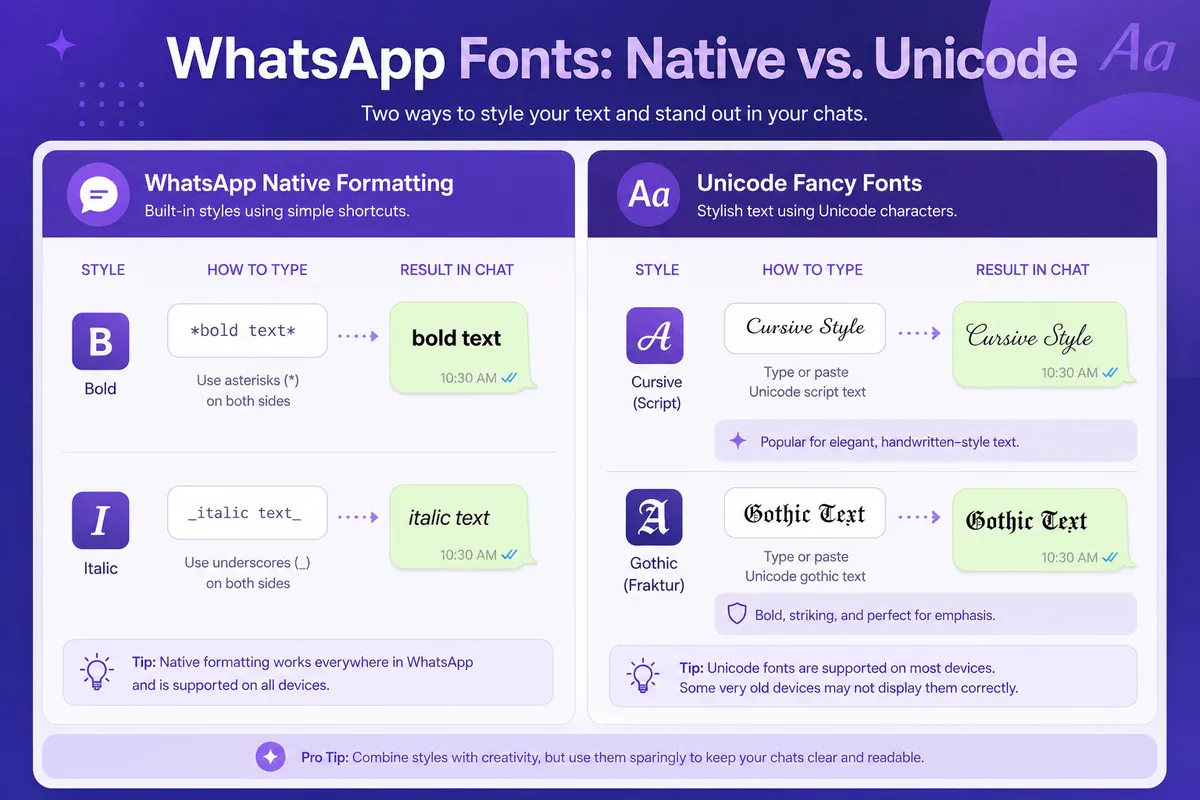
WhatsApp's native formatting works differently. Shortcuts such as *bold*, _italic_, and ~strikethrough~ apply formatting to ordinary message text. Unicode styles replace the original letters with different encoded characters.
What Font Does WhatsApp Use?
That's a different question from the styled text covered above. WhatsApp doesn't bundle a custom typeface for its interface. It uses each platform's system default instead: San Francisco on iPhone, Roboto or the manufacturer's font on Android, Segoe UI on Windows desktop.
There's no setting inside WhatsApp to change that interface font. What you can change is the text you send, using the Unicode styles from this guide.
A useful way to hold the three apart: the interface font is the platform's and cannot be changed; WhatsApp's own formatting changes how your text is styled but not which font renders it; and the Unicode styles on this page are different characters altogether, which is why they survive being copied between apps while formatting marks do not.
How to Use Fonts for WhatsApp Messages
The same copy-and-paste method can be used for personal chats, group conversations, broadcasts, and WhatsApp Web.
-
Open the generator. Visit the WhatsApp font generator in your phone or desktop browser.
-
Type your text. Enter the word, name, heading, or sentence you want to style.
-
Review the available styles. The page currently presents 15 WhatsApp-focused Unicode options.
-
Choose a readable option. Check every letter, number, punctuation mark, and symbol before copying.
-
Copy the converted text. Use the copy control beside your chosen style.
-
Open WhatsApp and paste. Go to the intended chat and paste the text into the message field.
-
Review and send. The same Unicode text is sent, although its shape and spacing may look different on another device.
You can mix styled and ordinary text in the same message. A short heading can use Unicode while dates, instructions, addresses, and contact details remain in plain text.
iPhone steps
- Open Safari or Chrome and go to the WhatsApp style picker.
- Type your message text and pick a style.
- Tap Copy beside it.
- Open WhatsApp and open the chat.
- Tap and hold the message field, then tap Paste.
- Read the line back before sending — check that every letter, digit and symbol survived the paste.
Android steps
- Open Chrome and go to the WhatsApp text generator.
- Enter the plain version of your text, then choose a style.
- Tap Copy.
- Open WhatsApp and the chat you want.
- Long-press the message field and choose Paste.
- Check the preview — on Android 6 and older, a few decorative styles show as empty squares.
The two differ only in the paste menu. If it is not appearing where you expect, the guide to copying and pasting fonts on iPhone and Android covers both in detail.
Message Example
Suppose you are posting a group reminder. Instead of styling the entire message, use Unicode for the heading and ordinary text for the details:
𝗠𝗲𝗲𝘁𝗶𝗻𝗴 𝗥𝗲𝗺𝗶𝗻𝗱𝗲𝗿 Tuesday at 3:00 PM Conference room B
The heading is easy to notice, while the time and location remain easy to read, search, and copy.
For longer family, school, or work messages, WhatsApp's native bold and list shortcuts are usually clearer than decorative Unicode.
Using Stylish Text in Status and Profile Fields
Short Status updates and profile fields are natural places to use fonts for WhatsApp bios because they contain less information than a full conversation.
However, keep each phrase brief and check how it looks after pasting. A style that appears clear in a large browser preview may be harder to read on a small profile screen.
How to Use Stylish Text in WhatsApp Status
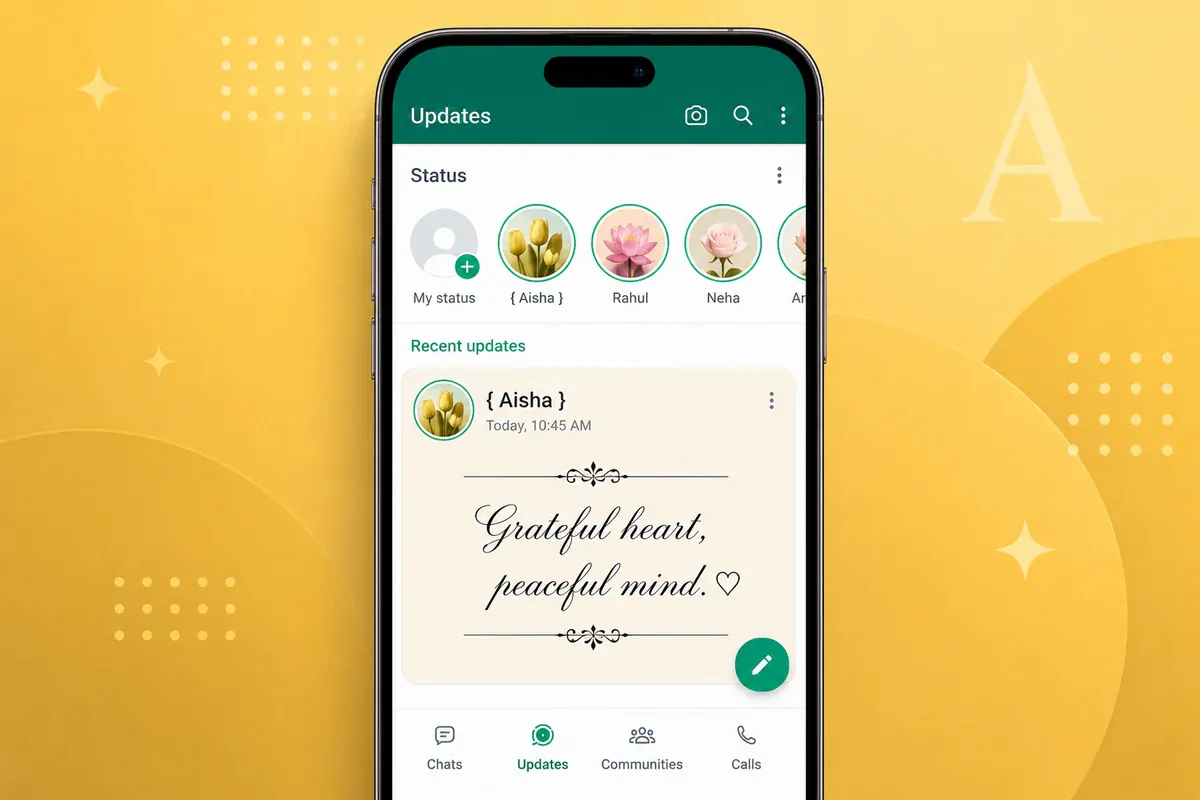
WhatsApp text Status updates can contain Unicode characters, although appearance and support may differ between devices.
Text Status also has something chats do not: a built-in font button. In the text Status editor, tap the T to cycle through WhatsApp's own handful of typefaces and the palette to change the background colour. Those typefaces exist only inside Status — they cannot be used in a chat, a name or the About field, and they apply to the whole Status, not to one word. The Unicode styles from this guide are different characters rather than a font, so they still paste into a text Status and keep their shape on top of whichever built-in font you choose. For a single styled word in an otherwise plain Status, Unicode is the only route; for the whole Status in a different look, the T button is simpler.
-
Write the Status in plain text first. Keep it short enough to read without pausing.
-
Next, open the stylish text tool in your browser.
-
Enter your Status text.
-
Compare a few styles. Script may suit a personal quote, while fullwidth text may suit a short heading.
-
Copy your selected version.
-
Open WhatsApp and go to Updates.
-
Choose the pencil or Text Status option. Its location may differ by device and app version. Tap T if you also want one of WhatsApp's built-in Status typefaces behind your text.
-
Paste the styled text and preview it.
-
Finally, choose a background or add an emoji, then post the Status.
Status Example
A birthday Status could use a styled greeting while keeping the date readable:
𝓗𝓪𝓹𝓹𝔂 𝓑𝓲𝓻𝓽𝓱𝓭𝓪𝔂 Dinner: 27 June, 7:30 PM
Decorative Unicode works well for the greeting. The date and time remain in plain text so guests can read and copy them easily. For personal quotes and greetings like this one, the cursive/script text generator covers script styles in more depth than the table further down this guide.
Setting a Fancy Font in Your WhatsApp Name and About
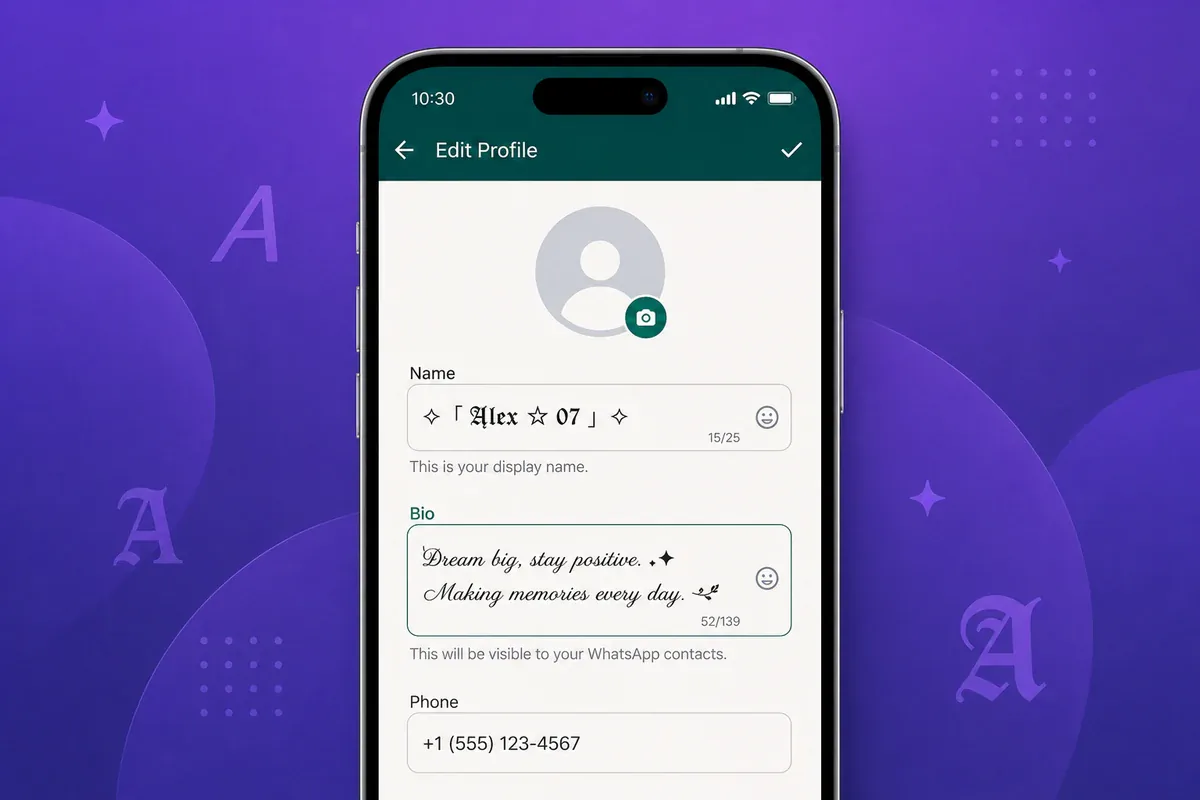
WhatsApp labels its profile bio as the About field.
Your display name and About field can contain supported Unicode characters. WhatsApp allows up to 25 characters for a display name and up to 139 characters for the About field. A decorated name uses those 25 quickly — a wrapper of symbols on each side can leave room for only a short name — while the About field has room for a styled line and a plain one beneath it.
Decorative characters count toward those limits, so prepare a short version before opening your settings. For a playful display name, the cute font generator has kawaii and bubble-letter styles built for exactly this kind of short profile text; for a heavier, more attention-grabbing name, the bold text generator has more weight options than the table below.
- Write your name or About line.
- Launch the generator and enter the text.
- Choose a style that remains clear at a small size.
- Press the copy button beside your chosen result.
- Open your WhatsApp profile settings. On Android, go to Three-dot menu → Settings → your profile. On iPhone, go to Settings → your profile.
- Tap the edit control beside your name or About field.
- Replace the existing text with the copied version.
- Save and check the result.
Your profile name may be shown to people who do not already have your number saved under another name, including some participants in shared groups.
Interface wording and limits can change. Check WhatsApp's profile editing guidance and About field guidance when reviewing or updating this guide.
Profile Example
A short display name normally works better than a heavily decorated one:
𝓢𝓪𝓻𝓪
A readable About line might be:
𝗔𝘃𝗮𝗶𝗹𝗮𝗯𝗹𝗲 𝟵–𝟱
Preview both fields on another device before depending on decorative characters.
Ready-Made Lines for Status, About and Messages
The examples above are one line each. These are whole sets in a single style, so a Status and the About line beneath it read as one thing rather than three competing ones. Swap the words for your own.
Status — WhatsApp Bold
| Line | Copy |
|---|---|
| Birthday | 𝗛𝗮𝗽𝗽𝘆 𝗕𝗶𝗿𝘁𝗵𝗱𝗮𝘆 |
| Stepping away | 𝗕𝗮𝗰𝗸 𝗶𝗻 10 𝗺𝗶𝗻𝘀 |
| Shop or service | 𝗢𝗽𝗲𝗻 𝘁𝗼𝗱𝗮𝘆 |
Name and About — WA Cursive Script
| Line | Copy |
|---|---|
| Display name | 𝓐𝔂𝓮𝓼𝓱𝓪 |
| Hours | 𝓐𝓿𝓪𝓲𝓵𝓪𝓫𝓵𝓮 9-5 |
| Do not disturb | 𝓑𝓾𝓼𝔂 · 𝓭𝓸 𝓷𝓸𝓽 𝓭𝓲𝓼𝓽𝓾𝓻𝓫 |
Message headings — Small Caps Status
| Line | Copy |
|---|---|
| Group reminder | ᴍᴇᴇᴛɪɴɢ ʀᴇᴍɪɴᴅᴇʀ |
| Business reply | ᴏʀᴅᴇʀ ᴄᴏɴꜰɪʀᴍᴇᴅ |
| Booking | ᴛᴀʙʟᴇ ꜰᴏʀ 4 ᴀᴛ 8 |
One detail worth knowing before you use these for anything time-sensitive: digits stay plain in every WhatsApp style on this site. 𝗕𝗮𝗰𝗸 𝗶𝗻 10 𝗺𝗶𝗻𝘀 keeps a readable 10, and ᴛᴀʙʟᴇ ꜰᴏʀ 4 ᴀᴛ 8 keeps both numbers. Unicode never encoded styled digit sets for these alphabets, and that turns out to be the right behaviour here — a time or a price stays legible and searchable inside a styled line.
WhatsApp Font Styles Compared
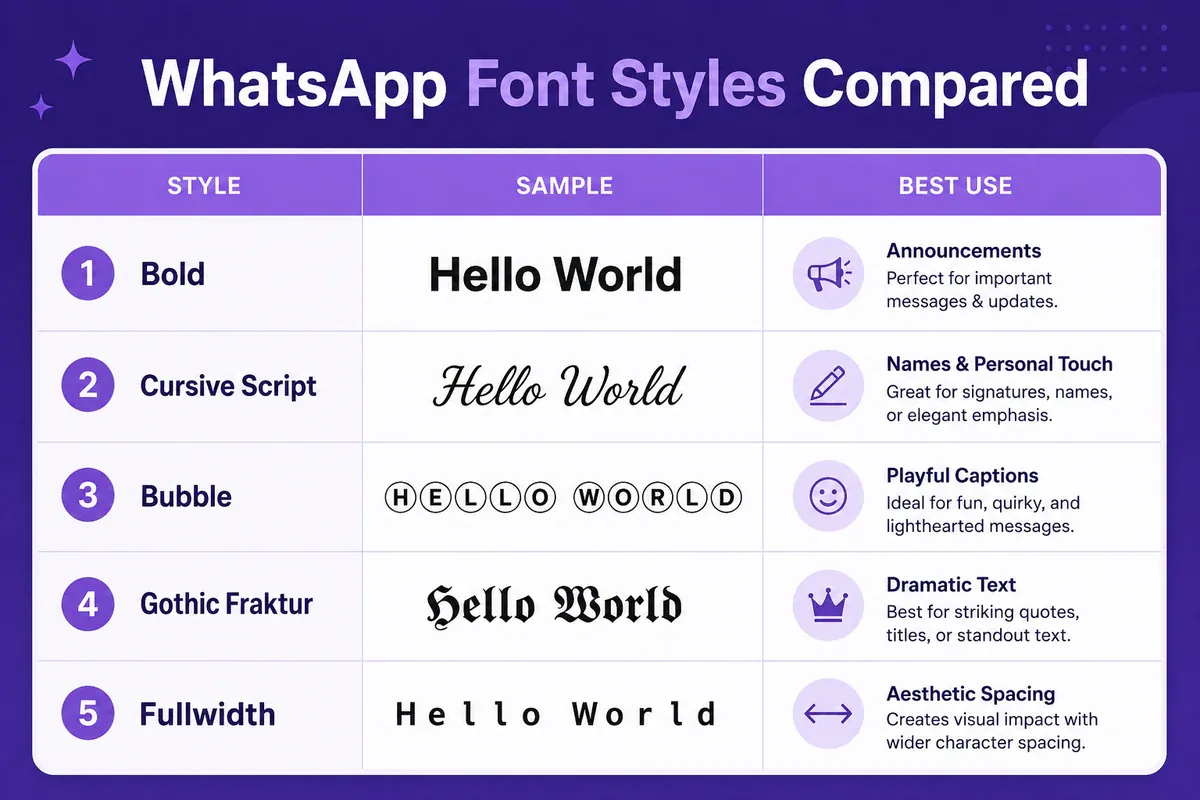
The generator currently presents 15 WhatsApp-focused styles. Each option suits a different kind of message.
| Style | Sample | Suggested use |
|---|---|---|
| WhatsApp Bold | 𝗛𝗲𝗹𝗹𝗼 | Short announcements and headings |
| WA Bold Fraktur | 𝕳𝖊𝖑𝖑𝖔 | Creative names and group tags |
| WA Tibetan | ༺ 𝓗𝓮𝓵𝓵𝓸 ༻ | Festive greetings |
| WA Cursive Script | 𝓗𝓮𝓵𝓵𝓸 | Personal wishes and quotes |
| Bubble Message | ⓗⓔⓛⓛⓞ | Playful conversations |
| WA Clean Sans | 𝖧𝖾𝗅𝗅𝗈 | Short, readable captions |
| WA Lightning | ⚡ 𝗛𝗲𝗹𝗹𝗼 ⚡ | Match alerts and event notices |
| Wide WA Status | Hello | Short Status headings |
The remaining styles suit more creative or niche uses:
| Style | Sample | Suggested use |
|---|---|---|
| Gothic | 𝔥𝔢𝔩𝔩𝔬 | Creative profiles |
| Bold Italic | 𝑯𝒆𝒍𝒍𝒐 | Quotes and brief emphasis |
| Small Caps | ʜᴇʟʟᴏ | Subtle About text |
| Hollow Outline | 𝕳𝕖𝕝𝕝𝕠 | Decorative titles |
| Decorated Stars | ✦ 𝗛𝗲𝗹𝗹𝗼 ✦ | Celebration messages |
| Underline | H̲e̲l̲l̲o̲ | Highlighting a short phrase |
| Strikethrough | H̶e̶l̶l̶o̶ | Corrections or jokes |
For dedicated style options and copy-paste examples, see the underline text generator and the strikethrough text generator.
Bold, clean sans, and fullwidth options are often easier to read than heavily decorated styles. Script, Gothic, and framed designs should normally be limited to short phrases.
Picking a Readable Style
Check three points before copying:
- Can every character be read quickly?
- Does the style remain clear at a small size?
- Would a missing or unclear character change the meaning?
For a delivery update, ordinary text or a short bold heading is safer than decorative script containing an address or order number.
The audience also matters. Bubble text may suit a casual conversation with friends, but it may look out of place in a customer-service reply. A readable bold option is normally a better fit for school, work, or business notices.
Accessibility and Search Limitations
Decorative characters may not always be handled like ordinary letters. Some screen readers may announce them differently. Also, search and copy functions may treat the converted characters as separate text.
Because of these limitations, avoid decorative Unicode for:
- Emergency information
- Phone numbers
- Email addresses
- Prices and payment instructions
- Street addresses
- Booking references
- Long paragraphs
- Detailed workplace instructions
However, a short styled heading followed by ordinary text offers a useful balance between appearance and readability.
For example:
𝗣𝗮𝘆𝗺𝗲𝗻𝘁 𝗥𝗲𝗺𝗶𝗻𝗱𝗲𝗿 Amount: $45 Due date: 30 June Reference: INV-2048
The heading attracts attention, but every detail needed to complete the payment remains easy to copy.
Using Fonts in Groups, Broadcasts and Business Messages
Fonts for WhatsApp groups, broadcasts, communities, and supported Business fields all work through the same Unicode copy-and-paste method. However, the same character-support limits apply in each area.
Use styled text as a visual label rather than as a replacement for clear writing. Recipients should be able to understand the message even when the decorative heading is ignored.
Using Fonts in WhatsApp Group Chats and Broadcasts
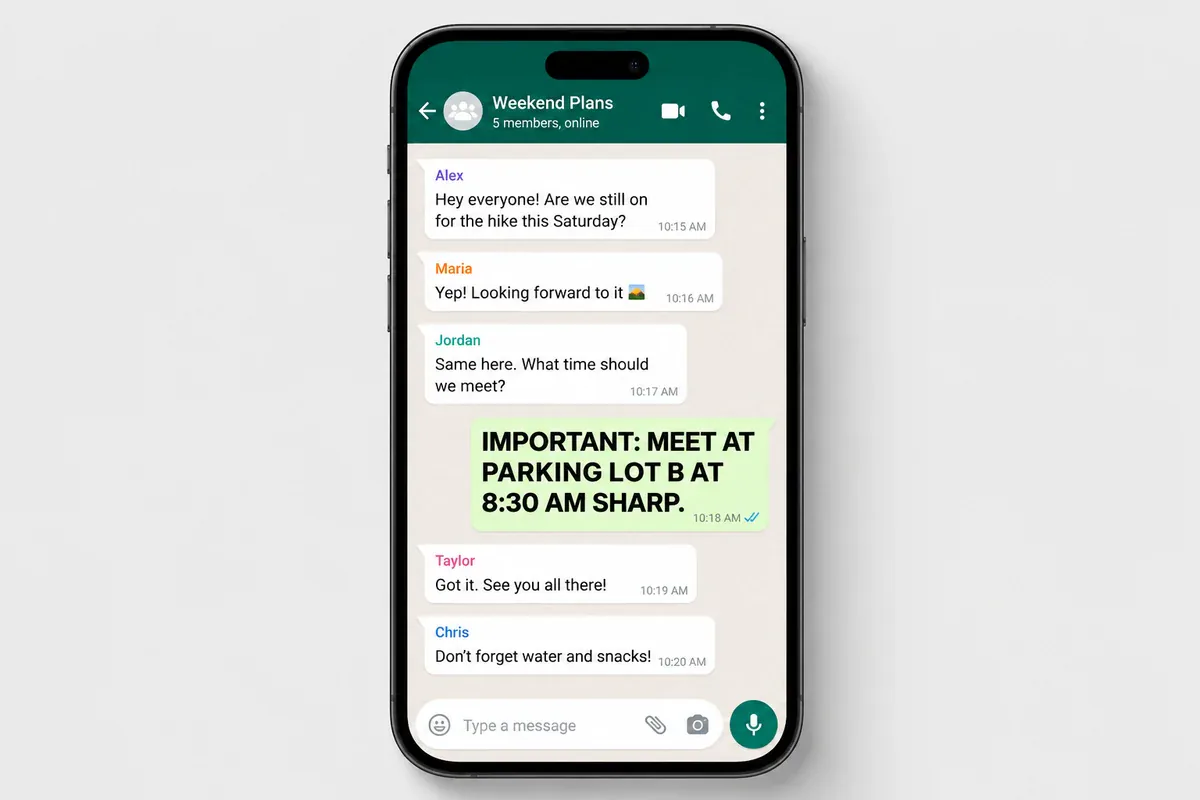
Bold Unicode can work well for short announcements because the letters remain familiar and easy to scan.
Decorative styles may suit holiday greetings, event reminders, or match updates. They can become tiring when used in routine conversations.
Large groups benefit from restraint. When many members are active, a wall of decorative text creates noise rather than emphasis. Reserve Unicode styling for pinned messages or scheduled announcements and keep routine messages in plain text.
Broadcast messages can use a short styled heading followed by ordinary text containing the details.
Group Message Example
𝗦𝗰𝗵𝗼𝗼𝗹 𝗧𝗿𝗶𝗽 𝗨𝗽𝗱𝗮𝘁𝗲 Departure: 8:00 AM Return: 4:30 PM Bring lunch and a water bottle.
The heading is distinct, but the times and instructions remain easy to understand.
WhatsApp does not provide a general control for changing the color of ordinary chat text. Unicode characters can change the appearance of letterforms, but they do not create a custom text-color setting.
Using Fancy Fonts in WhatsApp Business Messages

Unicode text may work in supported WhatsApp Business fields, including profile text and editable greeting or away messages. Preview each saved field before using it in customer communication.
Test greeting messages, away messages, profile text, and catalog descriptions in the current WhatsApp Business app. Check the saved result from another account or device before depending on styled characters.
Greeting Messages
Style the business name or a short heading while keeping the rest of the message plain:
𝗪𝗲𝗹𝗰𝗼𝗺𝗲 𝘁𝗼 𝗚𝗿𝗲𝗲𝗻 𝗟𝗲𝗮𝗳 Thank you for contacting us. We normally reply within two business hours.
The styled heading confirms the business identity. The response time stays in plain text so it remains easy to read.
Away Messages
Use a clear styled heading, but leave response times and contact details in ordinary text:
𝗪𝗲 𝗮𝗿𝗲 𝗰𝘂𝗿𝗿𝗲𝗻𝘁𝗹𝘆 𝗰𝗹𝗼𝘀𝗲𝗱 Opening time: 9:00 AM For urgent order questions, email support@example.com.
Check the saved message from another account before turning it on for customers.
Catalog Descriptions
Unicode text may also work in product descriptions. Use styling sparingly and preview the saved listing on another device before relying on it for prices, features, or other important information.
For example, a short product name could use bold Unicode, while the size, price, stock status, and delivery terms remain in ordinary text:
𝗖𝗼𝘁𝘁𝗼𝗻 𝗧𝗼𝘁𝗲 𝗕𝗮𝗴 Size: 38 × 42 cm Price: $12 Delivery: 2–4 business days
Business About Field
A short styled business name may fit the About field, but service details, opening hours, and contact information should remain clear.
Prepare each text block in the generator, paste it into the relevant field, save it, and check the result from another account or device.
WhatsApp Built-In Formatting vs. Unicode Fonts
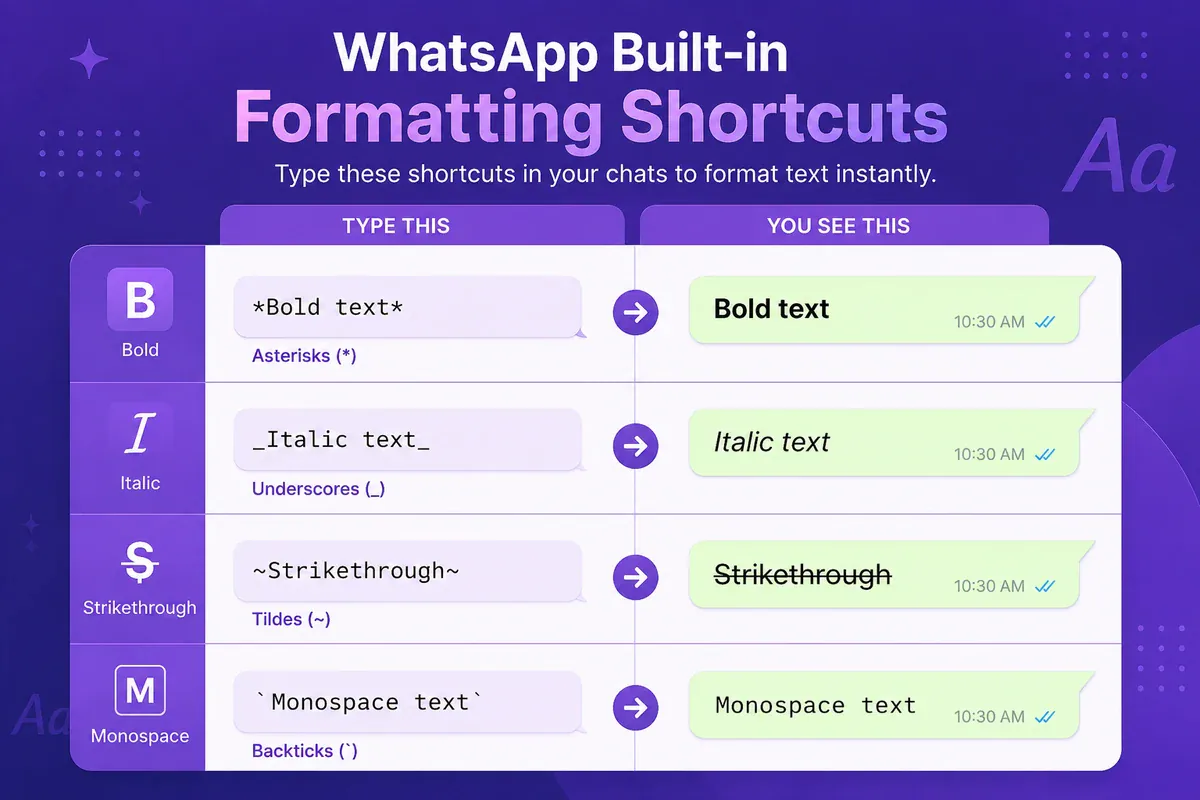
WhatsApp includes native text-formatting shortcuts that do not require an external tool. They are usually the better choice for everyday messages and longer text.
| Format | Shortcut | Example result |
|---|---|---|
| Bold | *text* | Hello |
| Italic | _text_ | Hello |
| Strikethrough | ~text~ | |
| Monospace | ```text``` | Hello |
| Bullet list | - item | • item |
| Numbered list | 1. item | 1. item |
| Block quote | > text | Quoted text |
| Inline code | `text` | text |
You do not have to type the symbols. Select text in the message field and a formatting menu appears — on iPhone through the pop-up after a long press, on Android through the selection toolbar — with Bold, Italic, Strikethrough and Monospace. WhatsApp's message-formatting guide covers every option, including lists, quotes and inline code.
Native formatting keeps ordinary letters and applies formatting within WhatsApp. In contrast, fonts for WhatsApp using Unicode styles replace the original letters with different encoded characters.
Use Native Formatting For
- Longer messages
- Instructions and schedules
- Work conversations
- Important details
- Lists and quotations
- Text that must be easy to search or copy
Use Unicode Styles For
- Short profile names
- Brief Status captions
- Festive greetings
- Decorative headings
- Creative group names
A native bold heading is often better for a detailed business message, while a short script greeting may suit a birthday Status.
The two methods can be used separately within the same conversation. Use native formatting for practical information and Unicode only where the appearance of a short phrase adds value.
Frequently Asked Questions
Do fonts for WhatsApp work on iPhone and Android?
Yes, fonts for WhatsApp work on many modern iPhone, Android, desktop, and web interfaces. However, their exact appearance depends on the device's font support, operating system, and app version. Because of this, always test decorative characters before using them for important details.
Can I use fancy fonts in WhatsApp Status without downloading an app?
Yes. Launch the generator in a browser, enter your Status text, copy a style, and paste it into the WhatsApp text Status editor. No app installation is needed.
Which style should I use for Eid or another festive message?
A framed or script option can suit a short greeting. Preview it first and choose the version that remains easiest to read. Always leave dates, locations, and contact information in plain text.
Can decorative Unicode text cause a WhatsApp account restriction?
Copying ordinary Unicode characters is different from installing an unofficial WhatsApp client. WhatsApp still applies its own rules to messages and account activity, so avoid spam, abusive content, and misleading messages regardless of the text style.
Why do fonts for WhatsApp look different on another phone?
The same Unicode text is sent, but its shape, spacing, and stroke weight may differ by device. Unsupported characters may appear as missing-glyph symbols, blank spaces, or no visible character.
What font does the WhatsApp app itself use?
WhatsApp uses each platform’s system font and gives you no setting to change it — the section What Font Does WhatsApp Use? above covers it in full.
Conclusion
Using fonts for WhatsApp is a copy-and-paste process rather than a change to WhatsApp's default typeface. Enter your text in the generator, choose a readable Unicode style, copy it, and paste it into a supported message, Status, profile, or business field.
Use decorative text for short headings, greetings, names, and captions. Instead, store dates, prices, addresses, phone numbers, booking references, instructions, and other essential information in plain text or WhatsApp's native formatting.
Try the available styles with FontifyText's WhatsApp font generator. The browser-based tool requires no account, as explained on the FontifyText About page.