
Artistic Projects and Crafts
Cursive Text Generator Copy Paste: Write Script Text Online
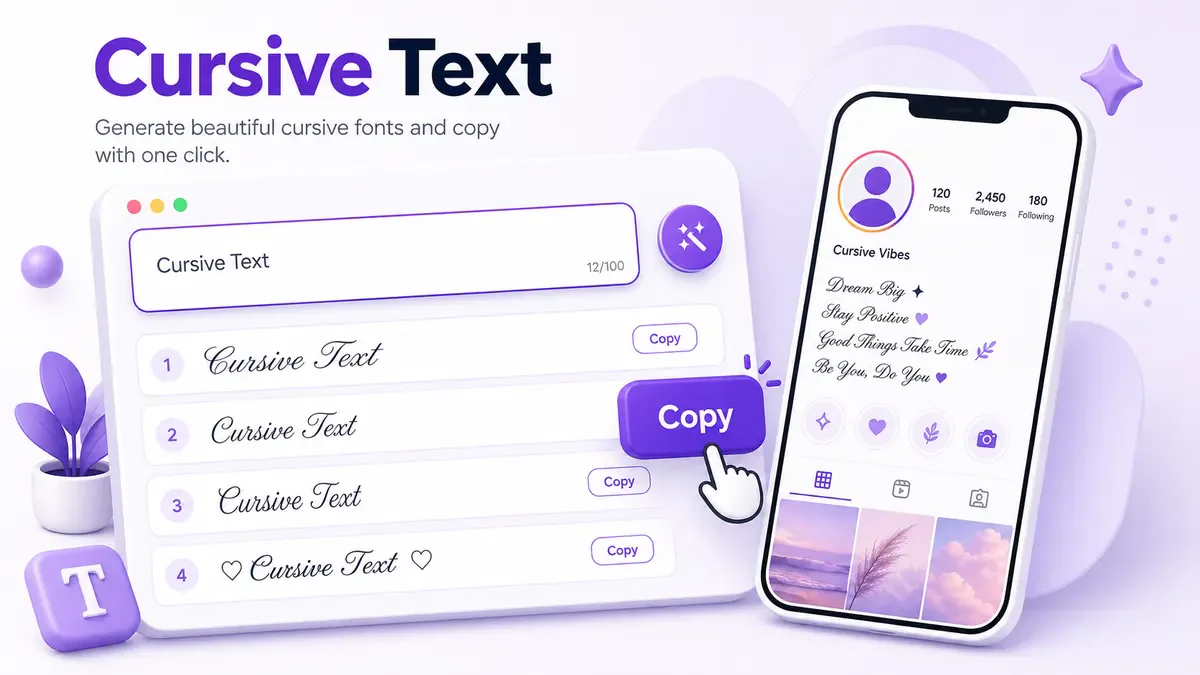
How to use a cursive text generator copy paste to get elegant script Unicode fonts for Instagram bios, captions, Discord names, and more social platforms.
Contents
- What Is a Cursive Text Generator?
- How to Use a Cursive Text Generator Copy Paste Tool
- Best Places to Use Cursive Copy-Paste Text
- Cursive Text Generator Copy Paste Examples
- 30 Cursive Text Examples to Copy and Paste
- Cursive Text Generator Copy Paste Readability Tips
- Cursive vs Fancy vs Italic Text
- Common Mistakes to Avoid
- Frequently Asked Questions
- Is cursive text a real font?
- Can I use cursive text on Instagram?
- Why does cursive text look different on some phones?
- Can I use cursive text in TikTok captions?
- Is the cursive text generator free?
- Final Tips for Better Cursive Text
What Is a Cursive Text Generator?
A cursive text generator copy paste tool helps you turn plain letters into script-style Unicode text for bios, captions, usernames, and messages. Unicode is the character system used by modern phones, browsers, and apps. It includes far more than A to Z. Some Unicode ranges contain mathematical script letters, italic letters, bold letters, small caps, enclosed letters, and other symbols that can be copied like normal text.
So when you make cursive text online, you are not installing a downloadable font file. You are replacing each normal character with a different Unicode character that already has a decorative shape. For example, a plain A can become a script-style letter that still copies and pastes into many text fields.
This difference matters. A font file changes how text looks only inside the design system where that font is loaded. Unicode text carries the styled characters themselves. That is why the same line can be pasted into Instagram, TikTok, WhatsApp, Discord, Facebook, or a browser field.
It also explains why the style can vary slightly across phones. The characters stay the same, but iPhone, Android, Windows, and web browsers may draw the symbols with small differences in stroke weight or spacing. That is normal. The safest habit is to keep cursive text short and check it on mobile before you post.
How to Use a Cursive Text Generator Copy Paste Tool
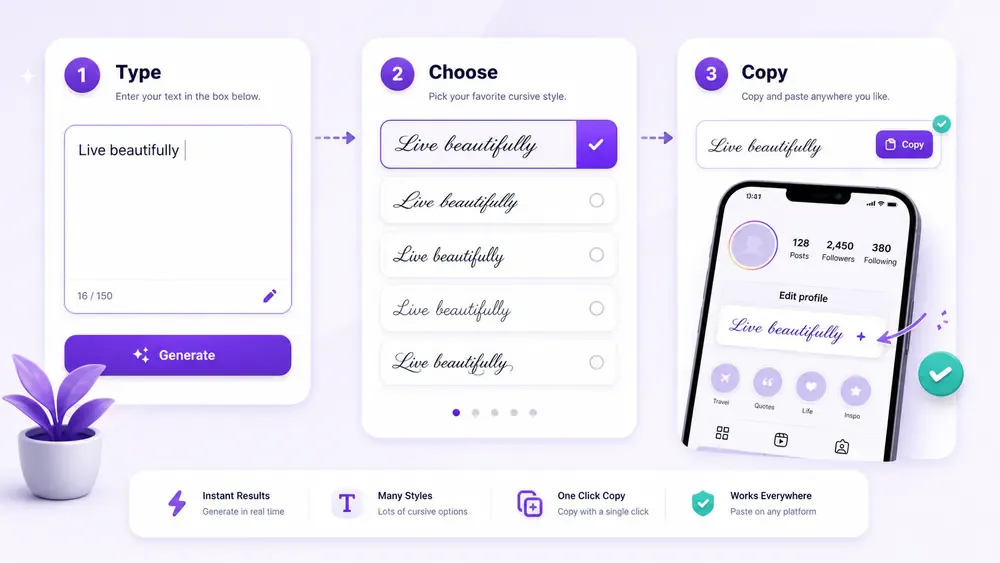
Using a cursive font generator copy paste tool is simple, but a few small checks make the result much better.
- Type your text into the generator input.
- Pick a cursive style that still reads clearly at phone size.
- Click Copy next to the version you like.
- Paste it into Instagram, TikTok, WhatsApp, Discord, or any bio and caption field that accepts Unicode text.
- Check readability on your phone before saving or posting.
Start with a short phrase instead of a full paragraph. Try your name, a two-word mood line, or one sentence from your caption. Cursive text has more curves and joins than plain text, so a line that looks beautiful on desktop can feel crowded inside a mobile profile.
The free font generator on FontifyText shows many styles at once, which makes comparison faster. If you want only script-like options, use the cursive font generator. If you want to compare cursive with stronger styles, the fancy text generator is a good next stop.
An expert note from real generator behavior: copy the final text from the button, not by dragging across the preview. Dragging can miss a character at the start or end, especially on mobile. The copy button grabs the full Unicode string in one action.
Best Places to Use Cursive Copy-Paste Text
Cursive text works best where personality matters more than speed reading. It gives a line a handwritten tone, so it suits names, soft captions, quotes, and aesthetic headers.
Instagram bios are one of the best places for cursive text copy and paste. Use it for your name, a short phrase, or the first line of your bio. Keep contact details, location, and calls to action in normal text so visitors can scan them quickly. For more profile examples, see the fonts for Instagram bio copy-paste guide.
TikTok captions can also use cursive text, but keep it short. A single styled word, a name, or a short mood line works better than a long sentence. Captions move fast, and viewers do not pause long to decode decorative letters.
WhatsApp names and statuses are another natural fit. A cursive display name can look personal without becoming loud. For statuses, use one clean phrase and avoid stacking symbols around it.
Discord nicknames can use cursive for a softer identity, especially in creative communities. Still, many servers prefer readable names, so test it in the member list before keeping it.
Facebook posts, YouTube comments, and short profile quotes can all use cursive text when the line is brief. Think of it as an accent, not the full voice of the post.
Cursive Text Generator Copy Paste Examples
Examples help because cursive text is about rhythm as much as letters. The best line is usually short enough to read in one glance.
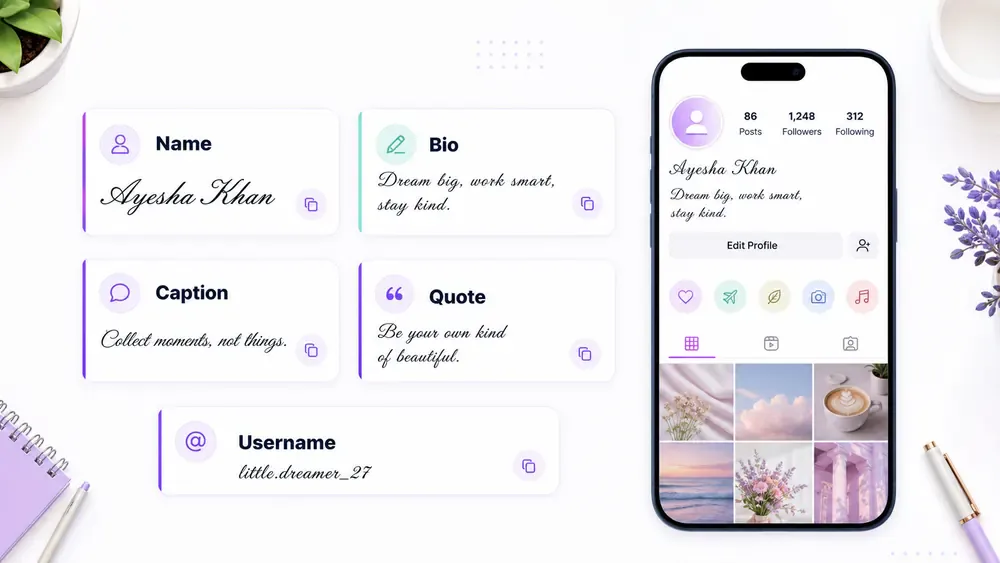
Short name style:
𝒜𝓂𝑒𝓁𝒾𝒶 𝑅𝑜𝓈𝑒
Use this for a display name, creator name, or profile header. If your name has many tall letters, compare two cursive styles and pick the one with the clearest spacing.
Romantic bio style:
𝓈𝑜𝒻𝓉 𝒽𝑒𝒶𝓇𝓉, 𝓈𝓉𝓇𝑜𝓃𝑔 𝓂𝒾𝓃𝒹
This works when the rest of the bio stays plain. Add location, email, or links in regular text below it.
Minimal caption style:
𝓈𝓁𝑜𝓌 𝓂𝑜𝓇𝓃𝒾𝓃𝑔
Short captions are where cursive shines. Two or three words can carry the mood without making people work too hard.
Fancy quote style:
𝒹𝑜 𝓉𝒽𝑒 𝓈𝓂𝒶𝓁𝓁 𝓉𝒽𝒾𝓃𝑔 𝓌𝑒𝓁𝓁
Quotes can handle more cursive than usernames, but keep them to one line if possible. If the quote wraps three times on mobile, use plain text for the main sentence and cursive for one highlighted word.
Username style:
𝓁𝓊𝓃𝒶.notes
Some platforms restrict usernames more than display names. If an app rejects styled Unicode characters in a username, use the cursive version as your display name instead.
30 Cursive Text Examples to Copy and Paste
Here are 30 ready-to-use cursive lines, grouped by the way people actually use them. Copy the one that fits your caption, bio, or display name.
Names
𝓐𝓶𝓮𝓵𝓲𝓪 𝓡𝓸𝓼𝓮 · 𝓖𝓻𝓪𝓬𝓮 𝓐𝓷𝓷𝓮 · 𝓘𝓼𝓪𝓫𝓮𝓵𝓵𝓪 · 𝓞𝓵𝓲𝓿𝓲𝓪 𝓙𝓪𝓶𝓮𝓼 · 𝓵𝓾𝓷𝓪.𝓷𝓸𝓽𝓮𝓼
Bios and mood lines
𝓼𝓸𝓯𝓽 𝓱𝓮𝓪𝓻𝓽, 𝓼𝓽𝓻𝓸𝓷𝓰 𝓶𝓲𝓷𝓭 · 𝔀𝓲𝓵𝓭 𝓪𝓷𝓭 𝓯𝓻𝓮𝓮 · 𝓺𝓾𝓲𝓮𝓽 𝓬𝓸𝓷𝓯𝓲𝓭𝓮𝓷𝓬𝓮 · 𝓼𝓽𝓪𝔂 𝓼𝓸𝓯𝓽 · 𝓼𝓽𝓲𝓵𝓵 𝓫𝓮𝓬𝓸𝓶𝓲𝓷𝓰
Captions
𝓼𝓵𝓸𝔀 𝓶𝓸𝓻𝓷𝓲𝓷𝓰 · 𝓰𝓸𝓵𝓭𝓮𝓷 𝓱𝓸𝓾𝓻 · 𝓬𝓸𝓯𝓯𝓮𝓮 𝓯𝓲𝓻𝓼𝓽 · 𝓸𝓬𝓮𝓪𝓷 𝓫𝓻𝓮𝓮𝔃𝓮 · 𝓼𝓾𝓷𝓭𝓪𝔂 𝓻𝓮𝓼𝓮𝓽
Quotes
𝓭𝓸 𝓽𝓱𝓮 𝓼𝓶𝓪𝓵𝓵 𝓽𝓱𝓲𝓷𝓰 𝔀𝓮𝓵𝓵 · 𝓬𝓱𝓪𝓼𝓮 𝔂𝓸𝓾𝓻 𝓭𝓻𝓮𝓪𝓶𝓼 · 𝓼𝓱𝓮 𝓫𝓮𝓵𝓲𝓮𝓿𝓮𝓭 𝓼𝓱𝓮 𝓬𝓸𝓾𝓵𝓭 · 𝓸𝓷𝓮 𝓼𝓽𝓮𝓹 𝓪𝓽 𝓪 𝓽𝓲𝓶𝓮 · 𝔀𝓪𝓷𝓭𝓮𝓻 𝓸𝓯𝓽𝓮𝓷
Aesthetic and wedding lines
𝓶𝓸𝓸𝓷𝓵𝓲𝓽 𝔀𝓪𝓵𝓴 · 𝓱𝓪𝓷𝓭𝔀𝓻𝓲𝓽𝓽𝓮𝓷 𝔀𝓲𝓽𝓱 𝓵𝓸𝓿𝓮 · 𝓯𝓸𝓻𝓮𝓿𝓮𝓻 𝓰𝓻𝓪𝓽𝓮𝓯𝓾𝓵 · 𝓵𝓲𝓽𝓽𝓵𝓮 𝔀𝓲𝓵𝓭𝓯𝓵𝓸𝔀𝓮𝓻 · 𝓶𝓪𝓭𝓮 𝔀𝓲𝓽𝓱 𝓬𝓪𝓻𝓮 · 𝓼𝓲𝓶𝓹𝓵𝓮 𝓳𝓸𝔂𝓼 · 𝓰𝓮𝓷𝓽𝓵𝓮 𝓻𝓮𝓶𝓲𝓷𝓭𝓮𝓻 · 𝓵𝓸𝓿𝓮 𝓷𝓸𝓽𝓮𝓼 · 𝓫𝓵𝓸𝓸𝓶𝓲𝓷𝓰 𝓺𝓾𝓲𝓮𝓽𝓵𝔂 · 𝓽𝓱𝓮 𝓼𝔀𝓮𝓮𝓽𝓮𝓼𝓽 𝓬𝓱𝓪𝓸𝓼
All 30 lines use the Mathematical Bold Script Unicode block, the gap-free style described above, so every letter renders consistently across iOS, Android, and desktop browsers. For a more ornate, calligraphic take on the same script idea, compare these with the guide to calligraphy styles — calligraphy styles lean further into decorative flourish, while cursive stays closer to everyday handwriting. Further along that same line, the swirly cursive font generator adds looping tails and curls, which suit a short name or heading better than a full sentence.
Cursive Text Generator Copy Paste Readability Tips
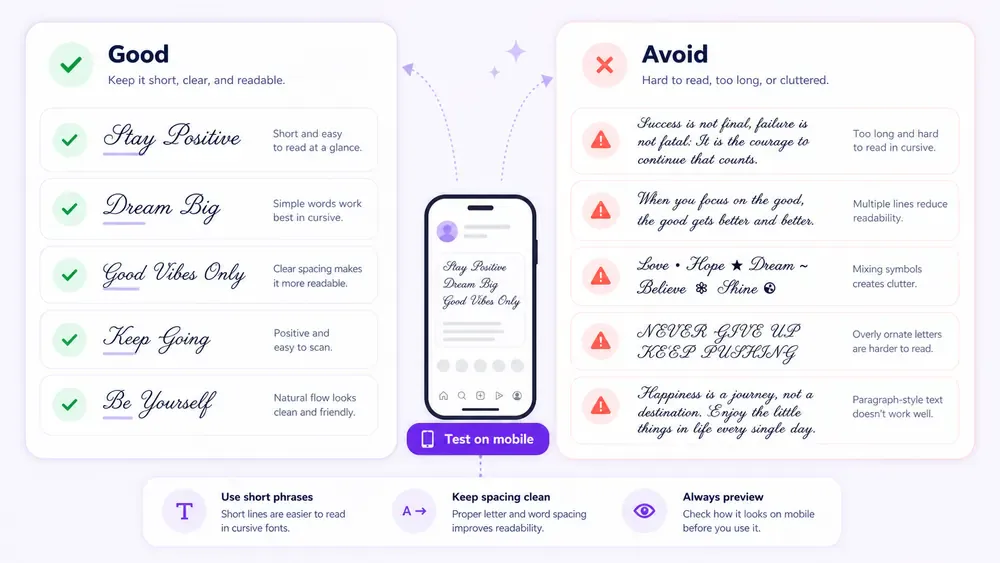
The prettiest cursive line is not always the best one for a profile. People read social pages quickly, often on a small screen, and decorative letters slow the eye down.
Use cursive for names, short phrases, aesthetic headers, and soft quote lines. Avoid using it for every word in a bio, long caption, or instructions. If the line contains your email, shop name, handle, location, price, or deadline, keep that information plain.
Keep important words in normal text. A simple pattern works well:
𝓈𝓉𝓊𝒹𝒾𝑜 𝓃𝒶𝓂𝑒
Custom cakes in Lahore
Orders: WhatsApp below
The first line gets style. The next lines do the work.
Test on mobile, not only desktop. Desktop screens make decorative letters look calmer because there is more space. On a phone, the same line may wrap early or feel tighter. Check both light and dark mode if the app has them.
Avoid long paragraphs. Cursive text has more visual texture than plain text, so a full paragraph becomes tiring. If you want a romantic caption, write most of it normally and style one short phrase at the end.
Cursive vs Fancy vs Italic Text
Cursive text looks like handwriting or script. It has loops, curves, and a softer tone. It is useful for names, quotes, lifestyle bios, wedding captions, beauty profiles, poetry pages, and gentle aesthetic posts. The same script letterforms are what people reach for in tattoo lettering, where a name or a single word carries the whole design.
Fancy text is a wider group. It can include cursive, bubble letters, small caps, symbols, bold text, glitch text, and decorated text. If you are not sure what style you want, fancy text lets you browse many options before choosing.
Italic text is usually cleaner than cursive. It leans to the right, but it does not have the same handwritten loops. Italic styles are better when you want emphasis without a highly decorative look.
The right choice depends on the job. Use cursive when you want warmth. Fancy text helps when you want to compare styles. Italic text fits when readability matters but plain text feels too flat.
If you want a darker style for usernames or fantasy captions, try the gothic text generator. Gothic text has a medieval blackletter look, while cursive text feels lighter and more handwritten.
Common Mistakes to Avoid
The first mistake is using too many symbols around the text. Stars, hearts, brackets, arrows, and cursive letters can look good alone, but together they compete. A clean cursive line usually works better than a crowded one.
The second mistake is making the whole bio hard to read. Visitors should understand who you are and what you offer within a few seconds. If every word is styled, the bio becomes decoration instead of communication.
The third mistake is mixing five styles in one line. Cursive plus bold text plus bubble text plus gothic letters creates visual noise. Pick one main style, then use plain text for support.
The fourth mistake is using unsupported characters in usernames. Some apps accept Unicode in display names but block it in handles. If the app rejects the text, try a simpler style or keep the styled version for the name field.
The fifth mistake is copying without testing display. Paste the text into the exact app before relying on it. If you see boxes, missing characters, odd spacing, or a broken line break, choose another style from the generator.
Frequently Asked Questions
Is cursive text a real font?
No. Cursive copy-paste text is made from Unicode characters, not a font file installed on your phone. It looks like a font because the characters have script shapes, but you are copying characters rather than changing typography settings.
Can I use cursive text on Instagram?
Yes. Instagram bios, captions, comments, and display names accept many Unicode cursive characters. Use cursive for short lines and keep important details in plain text so your profile stays easy to read.
Why does cursive text look different on some phones?
Different devices and apps draw Unicode symbols with different system fonts. The characters are the same, but the curves, spacing, and thickness can vary slightly between iPhone, Android, Windows, and browsers.
Can I use cursive text in TikTok captions?
Yes. TikTok captions can accept styled Unicode text. Keep it short because captions are read quickly. A single cursive phrase often works better than a full sentence in script.
Is the cursive text generator free?
Yes. The cursive text generator copy paste tool at FontifyText lets you type, convert, copy, and paste cursive text for free in your browser. You do not need an app, account, or special keyboard.
Final Tips for Better Cursive Text
Use cursive text like a highlight pen. It is best for one name, one mood line, one quote, or one part of a caption. When the styled line has room to breathe, people notice it without getting stuck on it.
Try your phrase in the full style directory, compare it with the joined cursive styles, and paste the final version into your app before saving. A cursive text generator copy paste style works best when the line is short, readable, and tested on mobile. For a sharper dark look, read the gothic text guide next and compare both styles side by side.